<?xml version="1.0" encoding="utf-8"?>
<feed xmlns="http://www.w3.org/2005/Atom">
    <id>https://brig.github.io/concord-intellij-ng/blog</id>
    <title>Concord IntelliJ Plugin Blog</title>
    <updated>2026-03-05T00:00:00.000Z</updated>
    <generator>https://github.com/jpmonette/feed</generator>
    <link rel="alternate" href="https://brig.github.io/concord-intellij-ng/blog"/>
    <subtitle>Concord IntelliJ Plugin Blog</subtitle>
    <icon>https://brig.github.io/concord-intellij-ng/favicon.png</icon>
    <entry>
        <title type="html"><![CDATA[What's New in Concord IntelliJ 0.21.0]]></title>
        <id>https://brig.github.io/concord-intellij-ng/blog/whats-new-0.21.0</id>
        <link href="https://brig.github.io/concord-intellij-ng/blog/whats-new-0.21.0"/>
        <updated>2026-03-05T00:00:00.000Z</updated>
        <summary type="html"><![CDATA[The 0.21.0 release extends Expression Language support with]]></summary>
        <content type="html"><![CDATA[<p>The <code>0.21.0</code> release extends Expression Language support with
<strong><a class="" href="https://brig.github.io/concord-intellij-ng/docs/features/completion#expression-function-completion">Built-in Function Completion</a></strong>,
<strong><a class="" href="https://brig.github.io/concord-intellij-ng/docs/features/completion#expression-task-method-completion">Task Method Completion</a></strong>, and
<strong><a class="" href="https://brig.github.io/concord-intellij-ng/docs/features/completion#call-output-parameter-completion">Call Output Parameter Completion</a></strong> inside <code>${...}</code> expressions,
adds a <strong><a class="" href="https://brig.github.io/concord-intellij-ng/docs/features/run-configurations#configuration-options">Required Parameters Check</a></strong> that catches missing mandatory flow parameters before execution,
a <strong><a class="" href="https://brig.github.io/concord-intellij-ng/docs/features/dependencies#repository-configuration">Repository Settings</a></strong> page for managing Maven repositories via <code>mvn.json</code>,
and a <strong><a class="" href="https://brig.github.io/concord-intellij-ng/docs/features/inspections">Resources Pattern Inspection</a></strong> that validates glob/regex patterns in <code>resources.concord</code>.</p>
<h2 class="anchor anchorTargetStickyNavbar_Vzrq" id="expression-function-completion">Expression Function Completion<a href="https://brig.github.io/concord-intellij-ng/blog/whats-new-0.21.0#expression-function-completion" class="hash-link" aria-label="Direct link to Expression Function Completion" title="Direct link to Expression Function Completion" translate="no">​</a></h2>
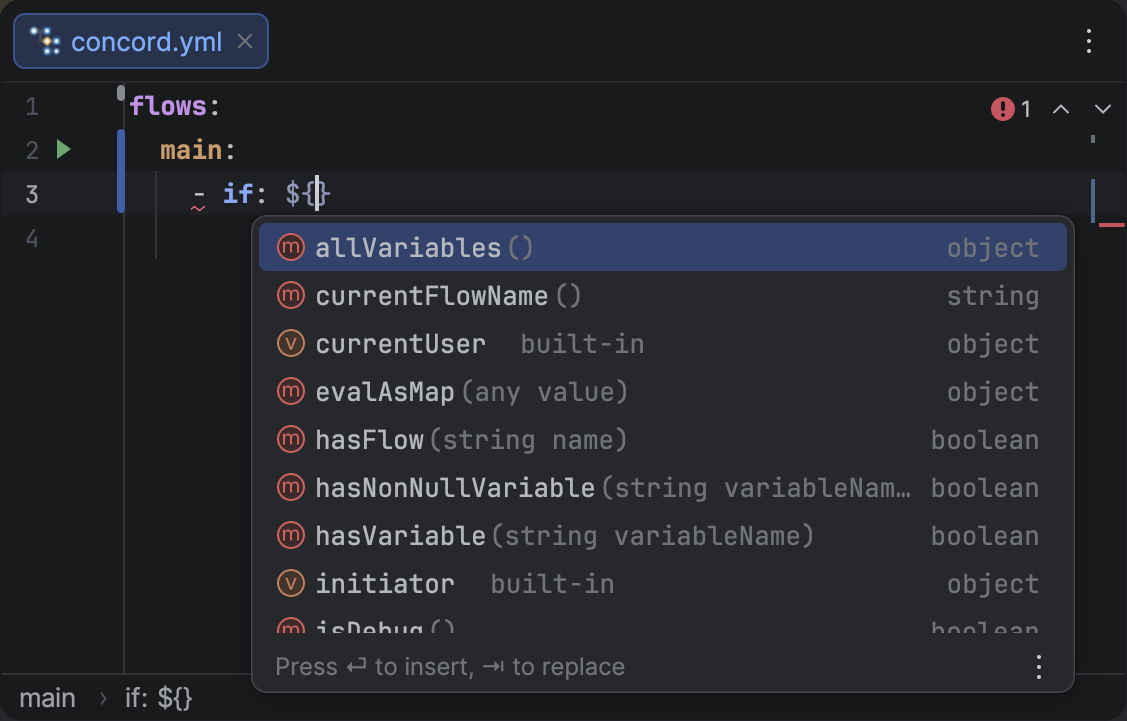
<p>Inside <code>${...}</code> expressions, pressing <span class="keystroke__keystrokes"><kbd class="keystroke">Ctrl</kbd><kbd class="keystroke">Space</kbd></span> now suggests Concord's built-in functions alongside variables. Each suggestion shows a method icon, the function name, its signature, and return type. Parentheses are inserted automatically — with the caret placed inside for functions that take parameters.</p>
<p>Available functions include <code>hasVariable()</code>, <code>hasNonNullVariable()</code>, <code>orDefault()</code>, <code>currentFlowName()</code>, <code>allVariables()</code>, <code>hasFlow()</code>, <code>uuid()</code>, and others.</p>
<figure class="docFigure docFigure--sm4"><img src="https://brig.github.io/concord-intellij-ng/assets/images/completion-el-functions-5b753b63bbb4d610dc80804b0d98f3e8.png" alt="Expression Function Completion"><figcaption><p>Function completion inside an EL expression, showing method icons, signatures, and return types.</p></figcaption></figure>
<h2 class="anchor anchorTargetStickyNavbar_Vzrq" id="expression-task-method-completion">Expression Task Method Completion<a href="https://brig.github.io/concord-intellij-ng/blog/whats-new-0.21.0#expression-task-method-completion" class="hash-link" aria-label="Direct link to Expression Task Method Completion" title="Direct link to Expression Task Method Completion" translate="no">​</a></h2>
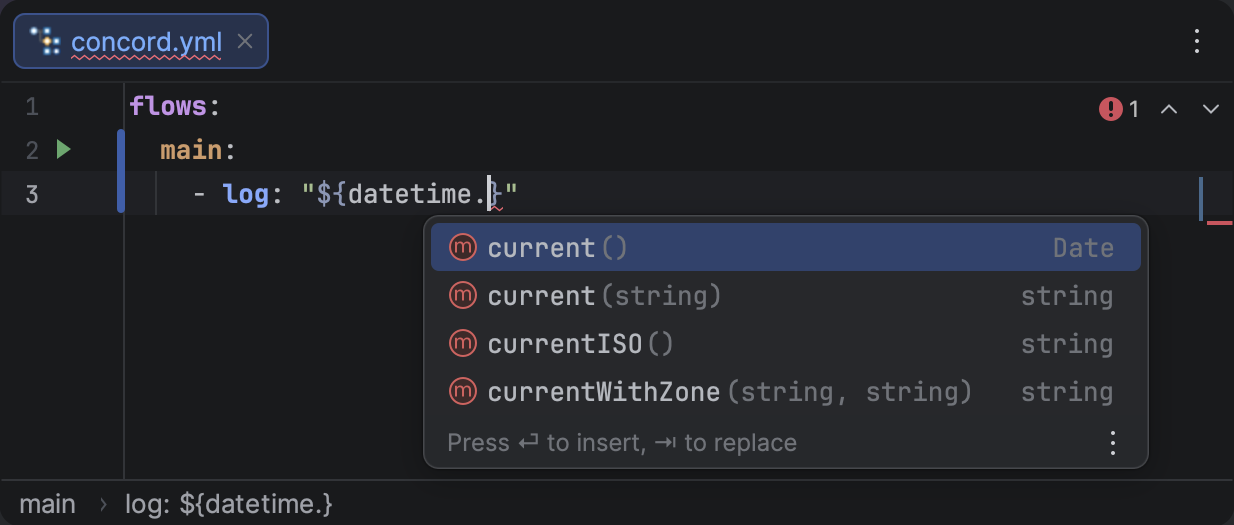
<p>When you type a dot after a task name in a <code>${...}</code> expression (e.g., <code>${datetime.}</code>), the plugin now suggests the public methods available on that task. Method signatures are extracted from the task's dependency JAR at the bytecode level, so they reflect the actual Java API.</p>
<figure class="docFigure docFigure--sm5"><img src="https://brig.github.io/concord-intellij-ng/assets/images/completion-el-task-methods-2b224db7190e8b457c8e986e448a1902.png" alt="Expression Task Method Completion"><figcaption><p>Task method completion after a dot, showing method names, parameter signatures, and return types.</p></figcaption></figure>
<h2 class="anchor anchorTargetStickyNavbar_Vzrq" id="required-flow-parameters-check">Required Flow Parameters Check<a href="https://brig.github.io/concord-intellij-ng/blog/whats-new-0.21.0#required-flow-parameters-check" class="hash-link" aria-label="Direct link to Required Flow Parameters Check" title="Direct link to Required Flow Parameters Check" translate="no">​</a></h2>
<p>When you run a flow that has mandatory input parameters (declared in a <a class="" href="https://brig.github.io/concord-intellij-ng/docs/features/flow-docs">flow documentation block</a>), the plugin now checks whether all required parameters have values before execution. If any are missing, it opens the Run Configuration dialog with the missing parameter rows pre-filled, so you can provide values before the flow starts.</p>
<h2 class="anchor anchorTargetStickyNavbar_Vzrq" id="repository-settings">Repository Settings<a href="https://brig.github.io/concord-intellij-ng/blog/whats-new-0.21.0#repository-settings" class="hash-link" aria-label="Direct link to Repository Settings" title="Direct link to Repository Settings" translate="no">​</a></h2>
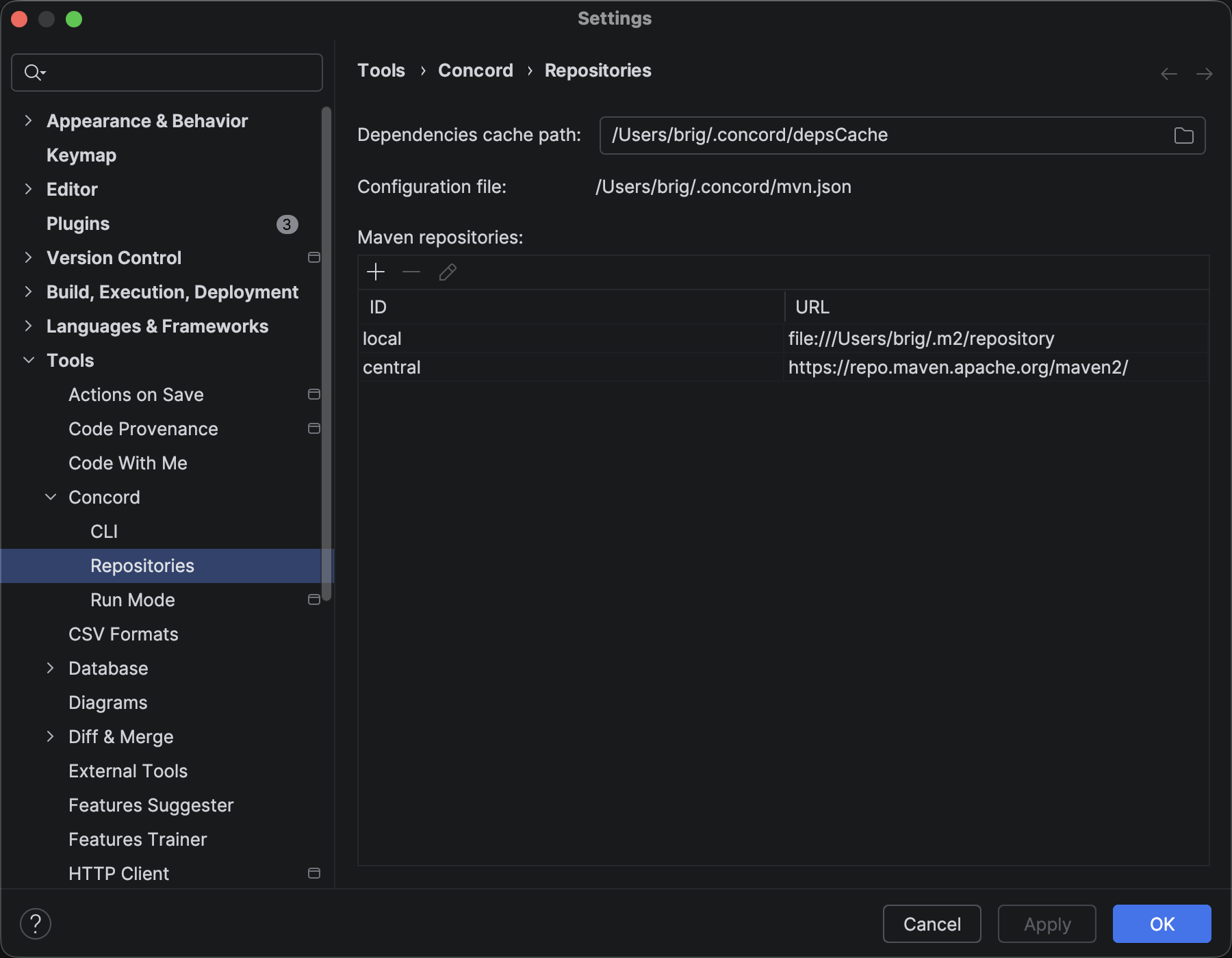
<p>A new <strong>Settings | Tools | Concord | Repositories</strong> page lets you manage Maven repositories directly from the IDE. The plugin reads and writes Concord CLI's <code>~/.concord/mvn.json</code> file, so the IDE and CLI always share the same repository configuration.</p>
<p>Each repository supports authentication, release/snapshot policies, and proxy settings. If no repositories are configured, the plugin falls back to Maven Central.</p>
<figure class="docFigure docFigure--lg"><img src="https://brig.github.io/concord-intellij-ng/assets/images/repositories-settings-7f0d53cb873904d9070fabc5d652271c.png" alt="Repositories settings page"><figcaption><p>The Repositories settings page showing configured Maven repositories and the dependencies cache path.</p></figcaption></figure>
<h2 class="anchor anchorTargetStickyNavbar_Vzrq" id="other-improvements">Other Improvements<a href="https://brig.github.io/concord-intellij-ng/blog/whats-new-0.21.0#other-improvements" class="hash-link" aria-label="Direct link to Other Improvements" title="Direct link to Other Improvements" translate="no">​</a></h2>
<ul>
<li class=""><strong>Resources Pattern Inspection:</strong> Invalid glob or regex patterns in <code>resources.concord</code> lists are now flagged with a warning, catching typos and syntax errors before runtime.</li>
<li class=""><strong>Configurable Target Directory:</strong> The target directory for CLI execution (default <code>.concord/target</code>) is now configurable in <strong>Settings | Tools | Concord Run Mode</strong>. The directory is automatically excluded from IntelliJ's indexing.</li>
<li class=""><strong>Call Output Variable Completion:</strong> Output parameters from <span class="tokenBadge" data-kind="step">call</span> steps are now available as variable suggestions in <code>${...}</code> expressions within the same step's <span class="tokenBadge" data-kind="step">out</span> block.</li>
<li class=""><strong>EL Task Name Completion:</strong> Task names from project dependencies are now suggested inside <code>${...}</code> expressions, with class icons to distinguish them from variables and functions.</li>
</ul>]]></content>
        <author>
            <name>Brig</name>
            <uri>https://github.com/brig</uri>
        </author>
        <category label="Release" term="Release"/>
        <category label="Features" term="Features"/>
    </entry>
    <entry>
        <title type="html"><![CDATA[What's New in Concord IntelliJ 0.20.0]]></title>
        <id>https://brig.github.io/concord-intellij-ng/blog/whats-new-0.20.0</id>
        <link href="https://brig.github.io/concord-intellij-ng/blog/whats-new-0.20.0"/>
        <updated>2026-02-21T00:00:00.000Z</updated>
        <summary type="html"><![CDATA[The 0.20.0 release is all about Expression Language support — bringing]]></summary>
        <content type="html"><![CDATA[<p>The <code>0.20.0</code> release is all about <strong>Expression Language support</strong> — bringing
<strong><a class="" href="https://brig.github.io/concord-intellij-ng/docs/features/highlighting#4-expressions">EL Highlighting</a></strong> with lexer-level coloring,
<strong><a class="" href="https://brig.github.io/concord-intellij-ng/docs/features/completion#expression-variable-completion">Variable Completion</a></strong> and <strong><a class="" href="https://brig.github.io/concord-intellij-ng/docs/features/completion#expression-property-completion">Property Completion</a></strong> inside <code>${...}</code> expressions,
<strong><a class="" href="https://brig.github.io/concord-intellij-ng/docs/features/navigation#expression-variables">Go to Declaration</a></strong> and <strong><a class="" href="https://brig.github.io/concord-intellij-ng/docs/features/find-usages#variable-usages">Find Usages</a></strong> for variables,
<strong><a class="" href="https://brig.github.io/concord-intellij-ng/docs/features/completion#expression-variable-completion">Variable Schema Inference</a></strong> across flow steps,
and <strong><a class="" href="https://brig.github.io/concord-intellij-ng/docs/features/run-configurations">JDK Selection</a></strong> for the Concord CLI.</p>
<h2 class="anchor anchorTargetStickyNavbar_Vzrq" id="expression-language-support">Expression Language Support<a href="https://brig.github.io/concord-intellij-ng/blog/whats-new-0.20.0#expression-language-support" class="hash-link" aria-label="Direct link to Expression Language Support" title="Direct link to Expression Language Support" translate="no">​</a></h2>
<p>Concord <code>${...}</code> expressions are now first-class citizens in the editor, with full IDE support from highlighting through navigation.</p>
<h3 class="anchor anchorTargetStickyNavbar_Vzrq" id="el-highlighting">EL Highlighting<a href="https://brig.github.io/concord-intellij-ng/blog/whats-new-0.20.0#el-highlighting" class="hash-link" aria-label="Direct link to EL Highlighting" title="Direct link to EL Highlighting" translate="no">​</a></h3>
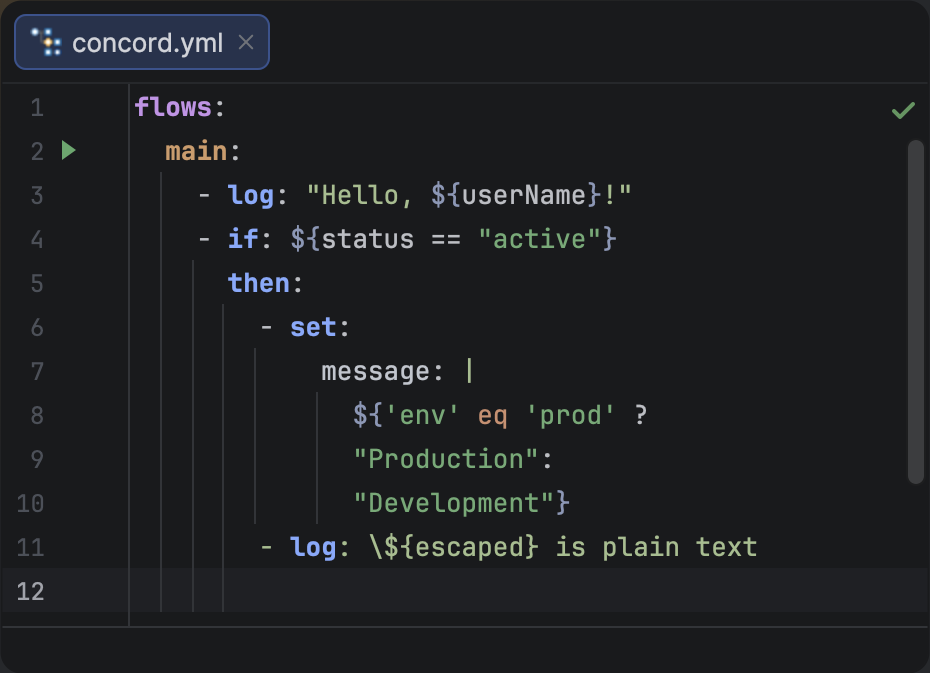
<p>Expression delimiters <code>${</code> and <code>}</code> are highlighted at the lexer level, providing accurate, real-time coloring as you type — including inline strings, multiple expressions, and nested braces.</p>
<figure class="docFigure docFigure--sm2"><img src="https://brig.github.io/concord-intellij-ng/assets/images/expression-highlighting-872fc595ffb039f55724bacf85b73b71.png" alt="EL Expression Highlighting"><figcaption><p>EL expression highlighting in Concord YAML files.</p></figcaption></figure>
<h3 class="anchor anchorTargetStickyNavbar_Vzrq" id="variable-completion">Variable Completion<a href="https://brig.github.io/concord-intellij-ng/blog/whats-new-0.20.0#variable-completion" class="hash-link" aria-label="Direct link to Variable Completion" title="Direct link to Variable Completion" translate="no">​</a></h3>
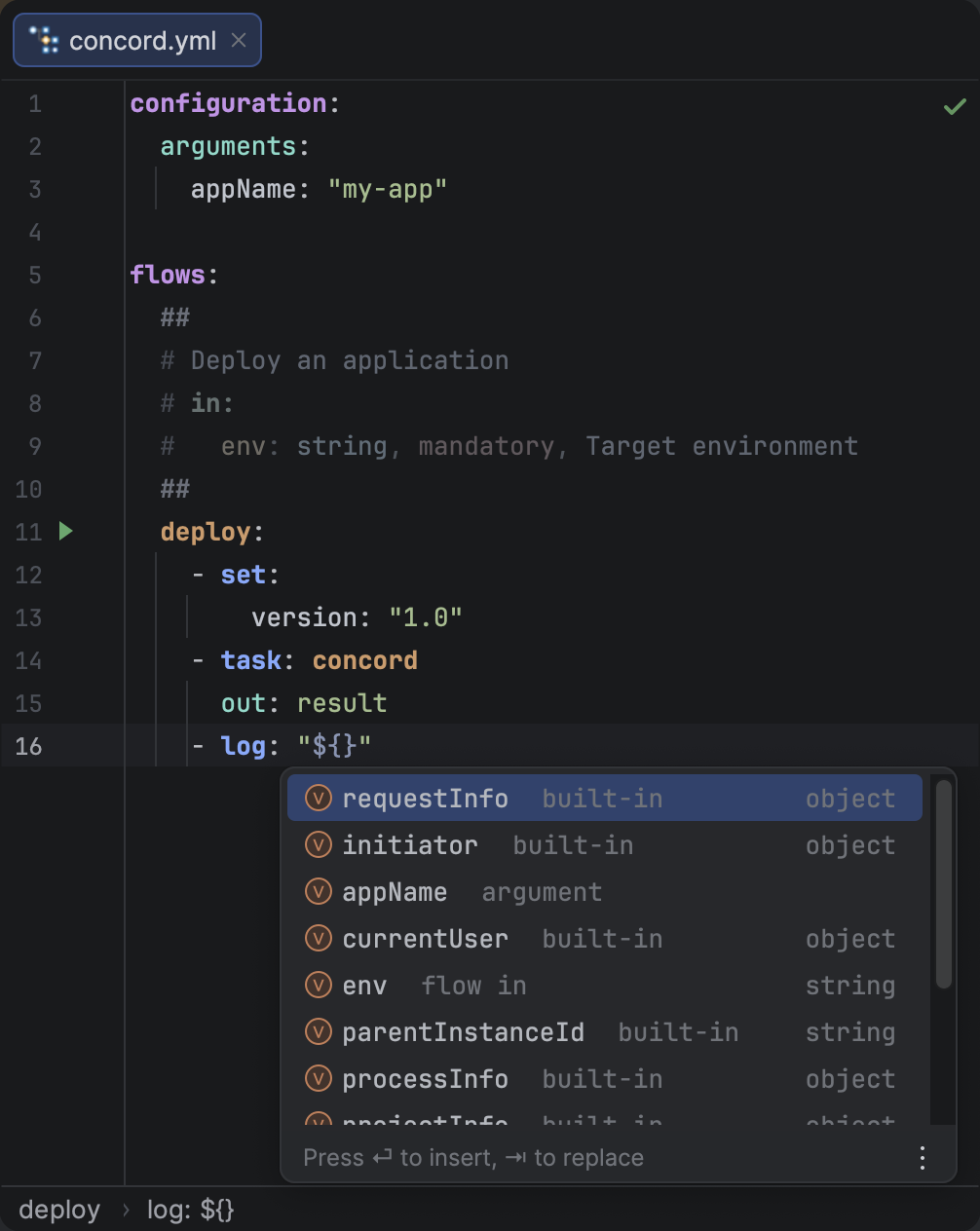
<p>Press <span class="keystroke__keystrokes"><kbd class="keystroke">Ctrl</kbd><kbd class="keystroke">Space</kbd></span> inside a <code>${...}</code> expression to see all variables in scope. Each suggestion shows the variable name, its source (e.g. <code>built-in</code>, <code>set</code>, <code>flow in</code>, <code>step out</code>), and its type when known. Completion is context-aware — only variables visible at the current step are suggested.</p>
<figure class="docFigure docFigure--sm4"><img src="https://brig.github.io/concord-intellij-ng/assets/images/completion-el-vars-2a337842fcc8b6945abe4b3ac68e05b3.png" alt="Expression Variable Completion"><figcaption><p>Variable completion inside an EL expression, showing variable icons, source labels, and types.</p></figcaption></figure>
<h3 class="anchor anchorTargetStickyNavbar_Vzrq" id="property-completion">Property Completion<a href="https://brig.github.io/concord-intellij-ng/blog/whats-new-0.20.0#property-completion" class="hash-link" aria-label="Direct link to Property Completion" title="Direct link to Property Completion" translate="no">​</a></h3>
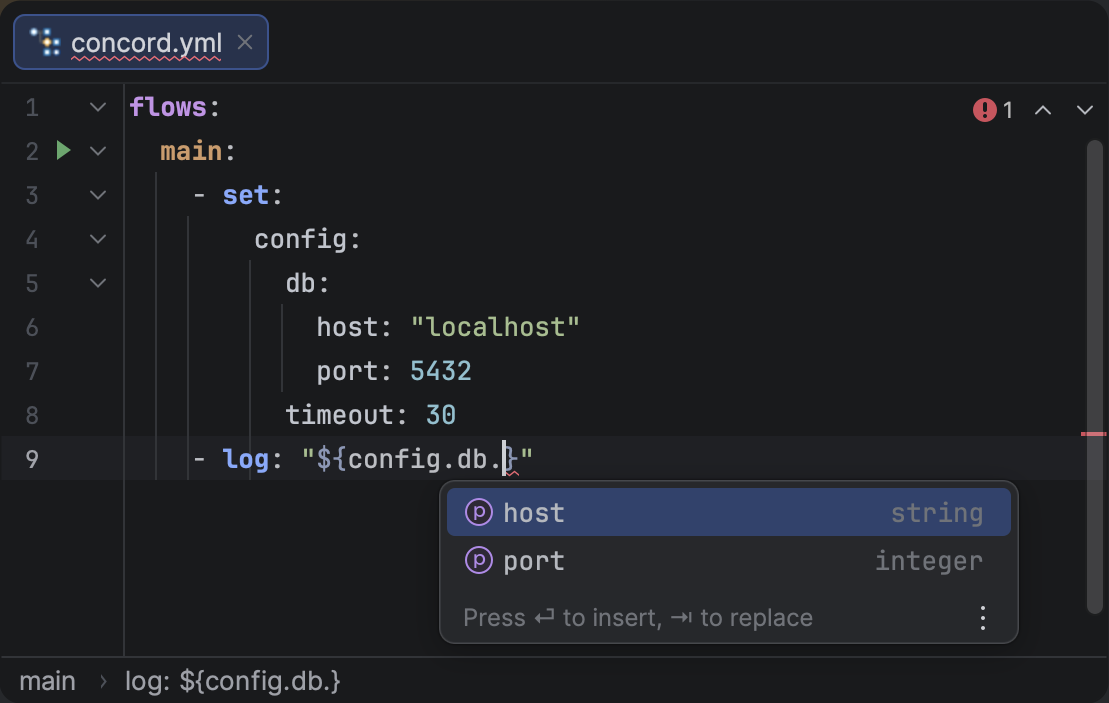
<p>After typing a dot in an expression (e.g. <code>${initiator.}</code>), the plugin suggests available sub-properties based on the variable's schema. This works for built-in variables, task output, and any variable whose structure can be inferred from the YAML.</p>
<figure class="docFigure docFigure--sm5"><img src="https://brig.github.io/concord-intellij-ng/assets/images/completion-el-props-a555f0dd8de3f1eaba68656cd8c18f3b.png" alt="Expression Property Completion"><figcaption><p>Property completion after a dot in an EL expression, showing available sub-fields with types.</p></figcaption></figure>
<h3 class="anchor anchorTargetStickyNavbar_Vzrq" id="go-to-declaration--find-usages">Go to Declaration &amp; Find Usages<a href="https://brig.github.io/concord-intellij-ng/blog/whats-new-0.20.0#go-to-declaration--find-usages" class="hash-link" aria-label="Direct link to Go to Declaration &amp; Find Usages" title="Direct link to Go to Declaration &amp; Find Usages" translate="no">​</a></h3>
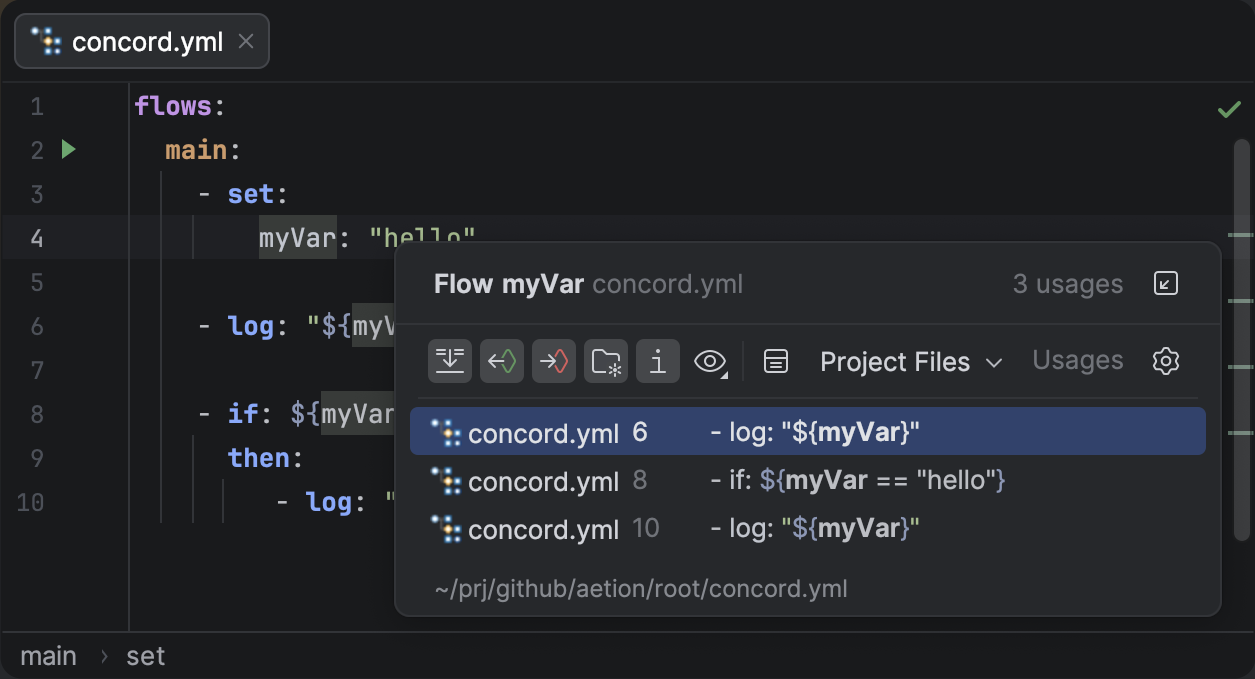
<p><span class="keystroke__keystrokes"><kbd class="keystroke">Ctrl</kbd></span> + <strong>Click</strong> on a variable in a <code>${...}</code> expression to jump to its declaration — whether it's a key in <code>configuration.arguments</code>, a parameter in a flow doc block, a <span class="tokenBadge" data-kind="step">set</span> step, or an <code>out</code> field of a task/call step. The same works in reverse: place the caret on a variable declaration and press <span class="keystroke__keystrokes"><kbd class="keystroke">Alt</kbd><kbd class="keystroke">F7</kbd></span> to find every expression that references it.</p>
<p>Navigation also works for <strong>nested properties</strong> — clicking <code>host</code> in <code>${config.db.host}</code> walks the property chain to the corresponding YAML key.</p>
<figure class="docFigure docFigure--sm4"><img src="https://brig.github.io/concord-intellij-ng/assets/images/find-usages-variable-97577faa9d9e3e4dfb1f14fee91d7180.png" alt="Find Usages for a variable"><figcaption><p>Find Usages showing all expression references to a variable declared in a set step.</p></figcaption></figure>
<h2 class="anchor anchorTargetStickyNavbar_Vzrq" id="variable-schema-inference">Variable Schema Inference<a href="https://brig.github.io/concord-intellij-ng/blog/whats-new-0.20.0#variable-schema-inference" class="hash-link" aria-label="Direct link to Variable Schema Inference" title="Direct link to Variable Schema Inference" translate="no">​</a></h2>
<p>The plugin now infers variable types from multiple sources across your flow, enabling typed completion and property suggestions for <code>${...}</code> expressions:</p>
<ul>
<li class=""><strong><code>set</code> steps</strong> — Variables assigned in <span class="tokenBadge" data-kind="step">set</span> steps have their structure inferred from the YAML mapping values.</li>
<li class=""><strong><code>configuration.arguments</code></strong> — Arguments declared at the top level are tracked with their types.</li>
<li class=""><strong><code>call</code> step <code>out</code></strong> — Output variables from a <span class="tokenBadge" data-kind="step">call</span> step are inferred from the target flow's documentation block.</li>
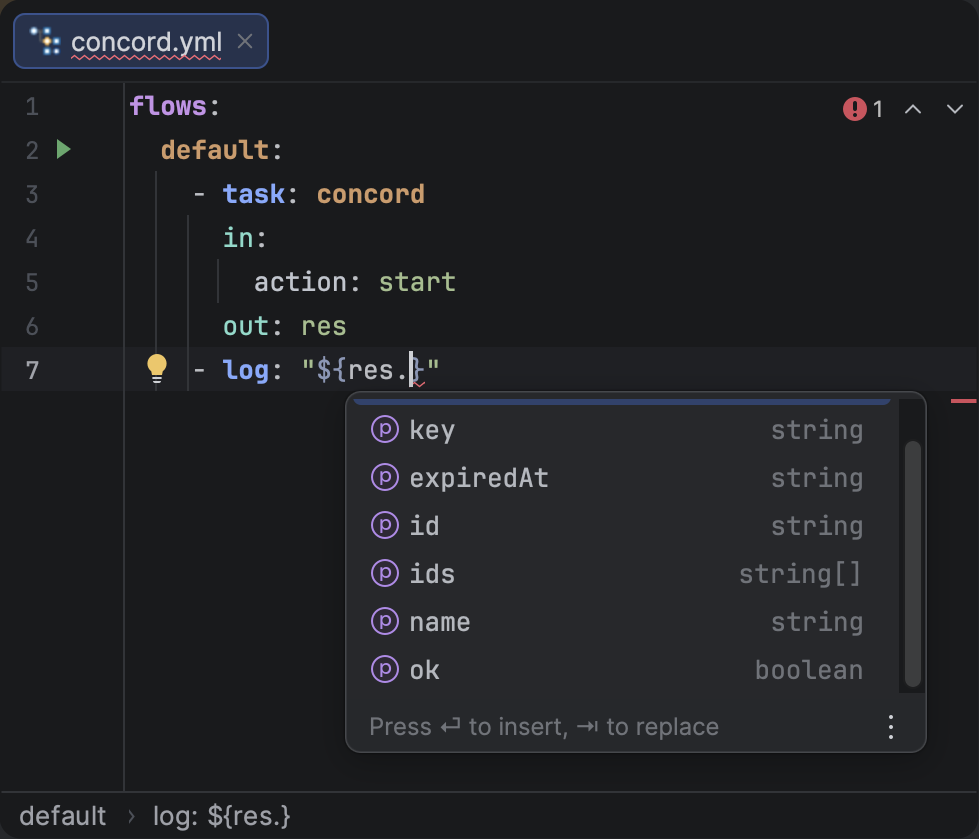
<li class=""><strong><code>task</code> step <code>out</code></strong> — Output variables from a <span class="tokenBadge" data-kind="step">task</span> step are inferred from the task's JSON schema.</li>
</ul>
<figure class="docFigure docFigure--sm4"><img src="https://brig.github.io/concord-intellij-ng/assets/images/auto-task-out-var-d81ba687f84acb233535937654358307.png" alt="Task output variable schema inference"><figcaption><p>Property completion for a task output variable, with types inferred from the task's JSON schema.</p></figcaption></figure>
<h2 class="anchor anchorTargetStickyNavbar_Vzrq" id="call-output-parameter-completion">Call Output Parameter Completion<a href="https://brig.github.io/concord-intellij-ng/blog/whats-new-0.20.0#call-output-parameter-completion" class="hash-link" aria-label="Direct link to Call Output Parameter Completion" title="Direct link to Call Output Parameter Completion" translate="no">​</a></h2>
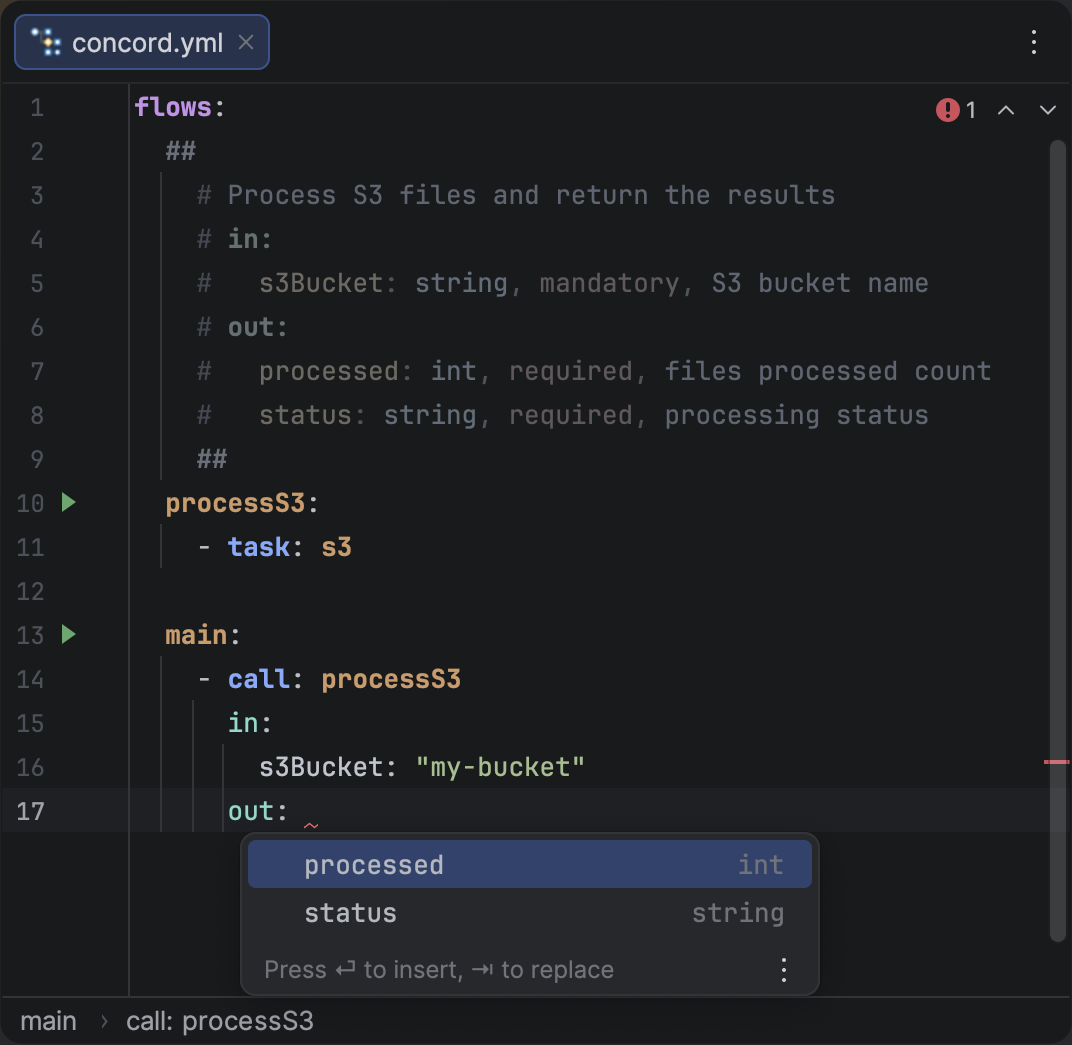
<p>When writing the <span class="tokenBadge" data-kind="step">out</span> field of a <span class="tokenBadge" data-kind="step">call</span> step,
the plugin now suggests output parameter names from the target flow's <a class="" href="https://brig.github.io/concord-intellij-ng/docs/features/flow-docs">Documentation Block</a>.
This works for both scalar and sequence forms of the <code>out</code> field.</p>
<figure class="docFigure docFigure--sm4"><img src="https://brig.github.io/concord-intellij-ng/assets/images/completion-call-out-2a82d8605be88c274114fefb42589a9a.png" alt="Call Output Parameter Completion"><figcaption><p>Completion popup suggesting output parameter names from the target flow's documentation block.</p></figcaption></figure>
<h2 class="anchor anchorTargetStickyNavbar_Vzrq" id="jdk-selection-for-concord-cli">JDK Selection for Concord CLI<a href="https://brig.github.io/concord-intellij-ng/blog/whats-new-0.20.0#jdk-selection-for-concord-cli" class="hash-link" aria-label="Direct link to JDK Selection for Concord CLI" title="Direct link to JDK Selection for Concord CLI" translate="no">​</a></h2>
<p>You can now select a specific JDK for running the Concord CLI, independent of the project SDK. This is useful when your project targets a different Java version than what Concord requires.</p>
<p>Configure it in <strong>Settings</strong> &gt; <strong>Tools</strong> &gt; <strong>Concord</strong> &gt; <strong>CLI</strong>.</p>
<h2 class="anchor anchorTargetStickyNavbar_Vzrq" id="other-improvements">Other Improvements<a href="https://brig.github.io/concord-intellij-ng/blog/whats-new-0.20.0#other-improvements" class="hash-link" aria-label="Direct link to Other Improvements" title="Direct link to Other Improvements" translate="no">​</a></h2>
<ul>
<li class=""><strong>Stale Highlighting Fix:</strong> The analysis daemon now restarts on external VFS changes, preventing stale highlighting after files are modified outside the IDE.</li>
</ul>]]></content>
        <author>
            <name>Brig</name>
            <uri>https://github.com/brig</uri>
        </author>
        <category label="Release" term="Release"/>
        <category label="Features" term="Features"/>
    </entry>
    <entry>
        <title type="html"><![CDATA[What's New in Concord IntelliJ 0.19.0]]></title>
        <id>https://brig.github.io/concord-intellij-ng/blog/whats-new-0.19.0</id>
        <link href="https://brig.github.io/concord-intellij-ng/blog/whats-new-0.19.0"/>
        <updated>2026-02-14T00:00:00.000Z</updated>
        <summary type="html"><![CDATA[The 0.19.0 release brings Hover Documentation for flows, tasks, and YAML keys,]]></summary>
        <content type="html"><![CDATA[<p>The <code>0.19.0</code> release brings <strong><a class="" href="https://brig.github.io/concord-intellij-ng/docs/features/hover-docs">Hover Documentation</a></strong> for flows, tasks, and YAML keys,
a <strong><a class="" href="https://brig.github.io/concord-intellij-ng/docs/features/completion#task-parameter-completion">Task Schema System</a></strong> that powers context-aware completion and validation for task parameters,
<strong><a class="" href="https://brig.github.io/concord-intellij-ng/docs/features/completion#quick-documentation-in-completion">Quick Documentation in Completion</a></strong> popups,
and a new <strong><a class="" href="https://brig.github.io/concord-intellij-ng/docs/features/dependencies#server-only-versions">Server-Only Dependency Inspection</a></strong> with an automatic quick fix.</p>
<h2 class="anchor anchorTargetStickyNavbar_Vzrq" id="hover-documentation">Hover Documentation<a href="https://brig.github.io/concord-intellij-ng/blog/whats-new-0.19.0#hover-documentation" class="hash-link" aria-label="Direct link to Hover Documentation" title="Direct link to Hover Documentation" translate="no">​</a></h2>
<p>You can now press <span class="keystroke__keystrokes"><kbd class="keystroke">Ctrl</kbd><kbd class="keystroke">Q</kbd></span> on any Concord element to see contextual documentation without leaving the editor.</p>
<h3 class="anchor anchorTargetStickyNavbar_Vzrq" id="flow-call-documentation">Flow Call Documentation<a href="https://brig.github.io/concord-intellij-ng/blog/whats-new-0.19.0#flow-call-documentation" class="hash-link" aria-label="Direct link to Flow Call Documentation" title="Direct link to Flow Call Documentation" translate="no">​</a></h3>
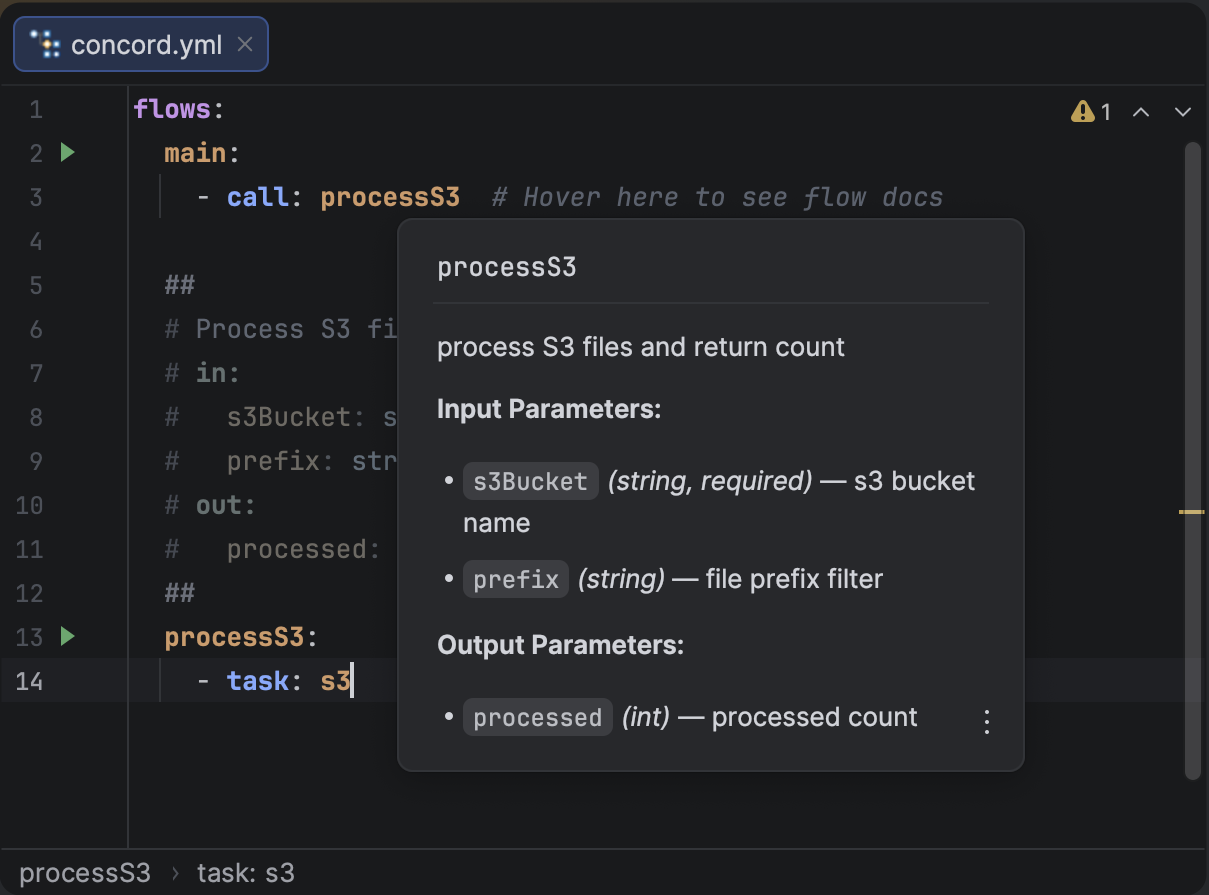
<p>Hovering over a flow name in a <span class="tokenBadge" data-kind="step">call</span> step shows the flow's description, input/output parameters with types, required/optional flags, and descriptions — all extracted from the target flow's <a class="" href="https://brig.github.io/concord-intellij-ng/docs/features/flow-docs">documentation block</a>.</p>
<figure class="docFigure docFigure--sm5"><img src="https://brig.github.io/concord-intellij-ng/assets/images/hover-docs-flow-d04b6a65ddce8d99d85e33e18e1dbdec.png" alt="Flow Hover Documentation"><figcaption><p>Hover documentation for a flow call showing parameters from its documentation block.</p></figcaption></figure>
<h3 class="anchor anchorTargetStickyNavbar_Vzrq" id="task-documentation">Task Documentation<a href="https://brig.github.io/concord-intellij-ng/blog/whats-new-0.19.0#task-documentation" class="hash-link" aria-label="Direct link to Task Documentation" title="Direct link to Task Documentation" translate="no">​</a></h3>
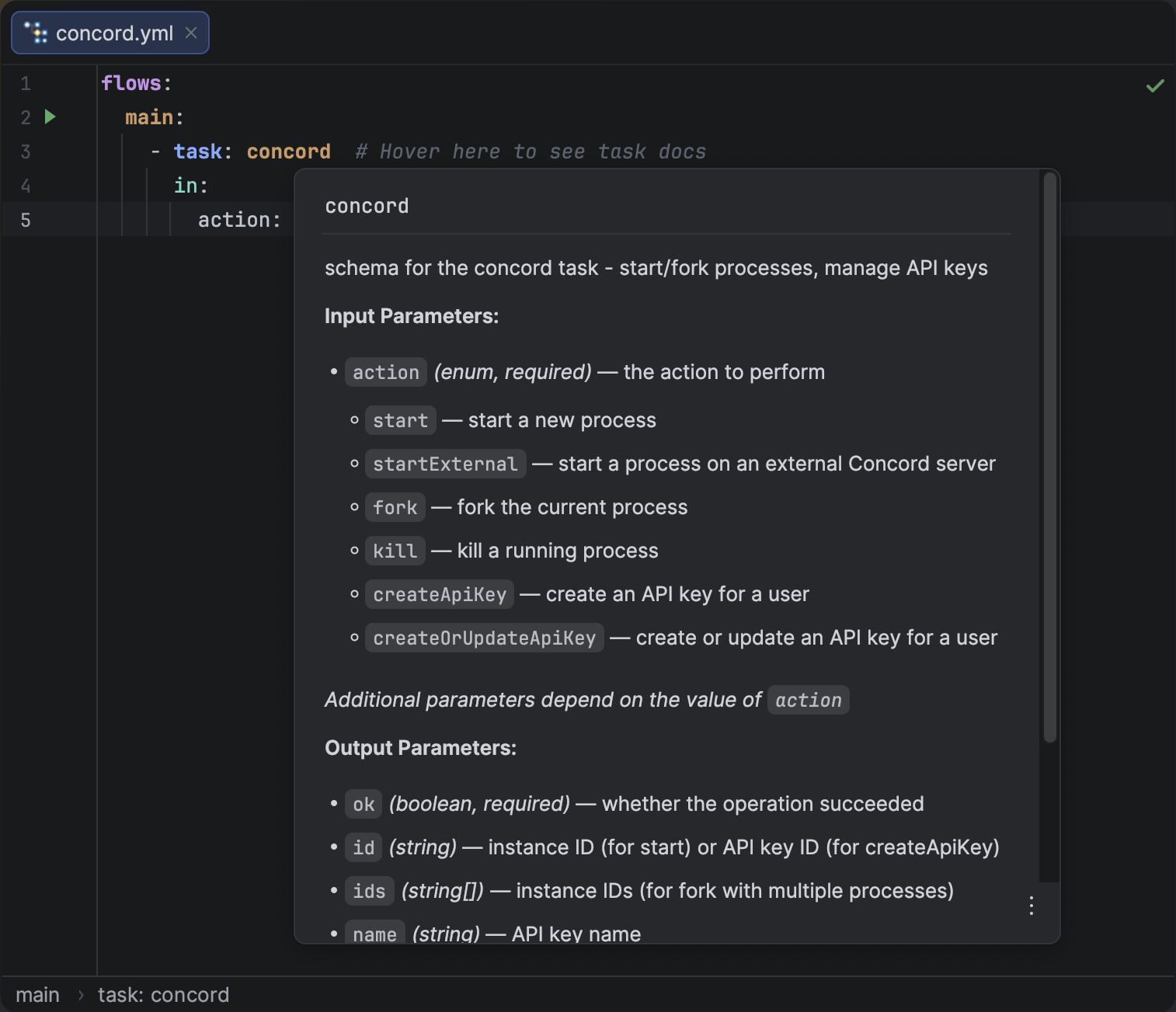
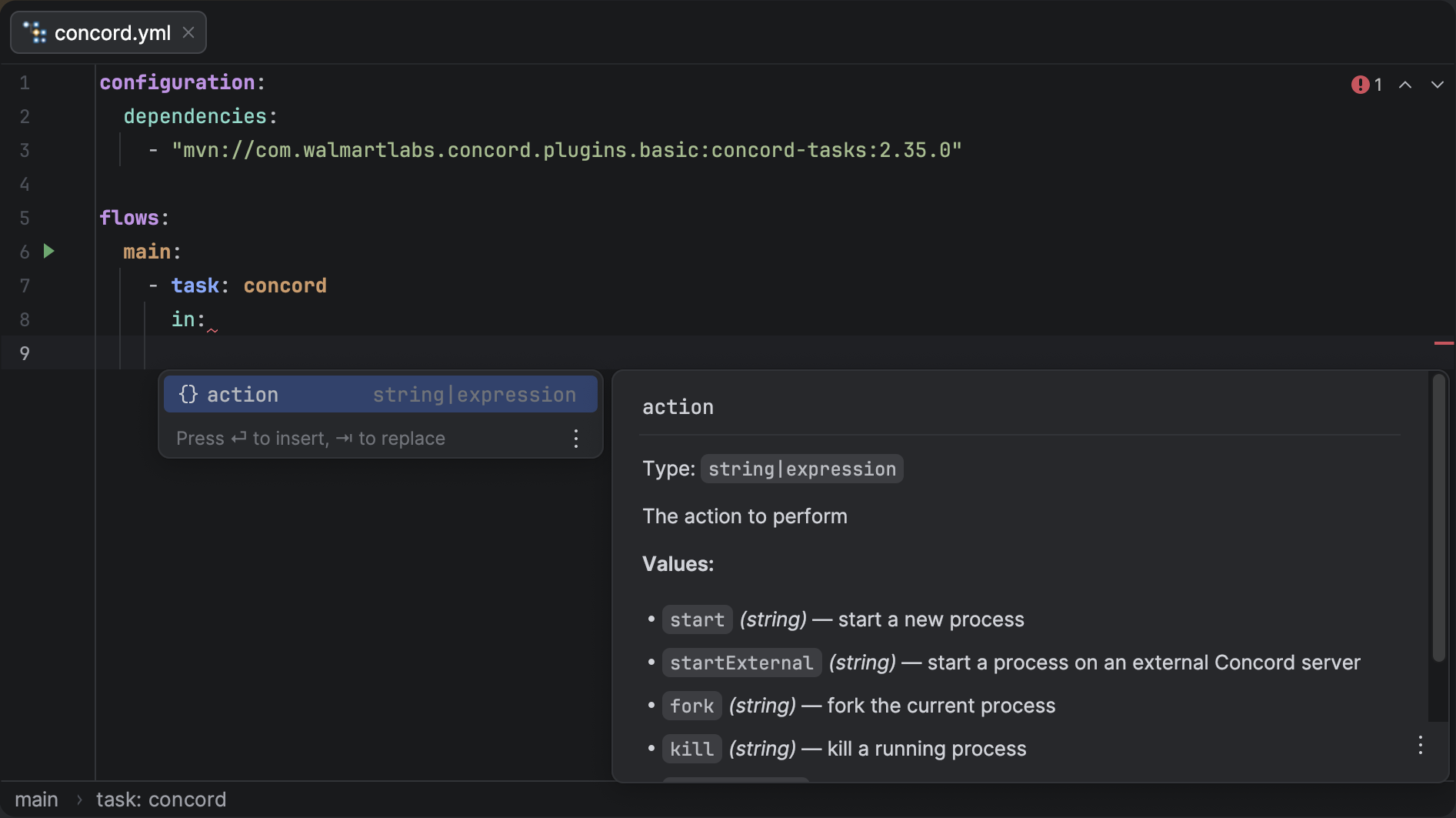
<p>Hovering over a task name shows its full description along with input/output parameters, types, and enum values — powered by built-in task schemas. For tasks with conditional parameters (e.g. different params for <code>action: start</code> vs <code>action: fork</code>), the popup groups them intelligently.</p>
<figure class="docFigure docFigure--md"><img src="https://brig.github.io/concord-intellij-ng/assets/images/hover-docs-task-10b45e47092bfc7c4d2eefa2144b3ede.png" alt="Task Hover Documentation"><figcaption><p>Hover documentation for a task showing input and output parameters from the task schema.</p></figcaption></figure>
<h3 class="anchor anchorTargetStickyNavbar_Vzrq" id="yaml-key-documentation">YAML Key Documentation<a href="https://brig.github.io/concord-intellij-ng/blog/whats-new-0.19.0#yaml-key-documentation" class="hash-link" aria-label="Direct link to YAML Key Documentation" title="Direct link to YAML Key Documentation" translate="no">​</a></h3>
<p>Hovering over any Concord YAML key — top-level sections, step types, and their properties — shows a description of that key's purpose in context.</p>
<h2 class="anchor anchorTargetStickyNavbar_Vzrq" id="task-schema-system">Task Schema System<a href="https://brig.github.io/concord-intellij-ng/blog/whats-new-0.19.0#task-schema-system" class="hash-link" aria-label="Direct link to Task Schema System" title="Direct link to Task Schema System" translate="no">​</a></h2>
<p>A new JSON Schema-based system powers intelligent completion and validation for <span class="tokenBadge" data-kind="step">task</span> step parameters.</p>
<ul>
<li class=""><strong>Parameter Completion:</strong> The plugin suggests valid <code>in</code> parameter names for known tasks as you type.</li>
<li class=""><strong>Enum Value Completion:</strong> For parameters that accept a fixed set of values (e.g. <code>action</code>, <code>method</code>), the allowed options are suggested.</li>
<li class=""><strong>Conditional Parameters:</strong> Suggestions adapt based on already specified values. After setting <code>action: start</code>, only parameters relevant to the <code>start</code> action are suggested.</li>
<li class=""><strong>Validation:</strong> Unknown keys and invalid values inside task <code>in</code>/<code>out</code> blocks are flagged by inspections.</li>
</ul>
<p>The initial release ships with the built-in <code>concord</code> task schema. More task schemas will be added in future releases.</p>
<h2 class="anchor anchorTargetStickyNavbar_Vzrq" id="quick-documentation-in-completion">Quick Documentation in Completion<a href="https://brig.github.io/concord-intellij-ng/blog/whats-new-0.19.0#quick-documentation-in-completion" class="hash-link" aria-label="Direct link to Quick Documentation in Completion" title="Direct link to Quick Documentation in Completion" translate="no">​</a></h2>
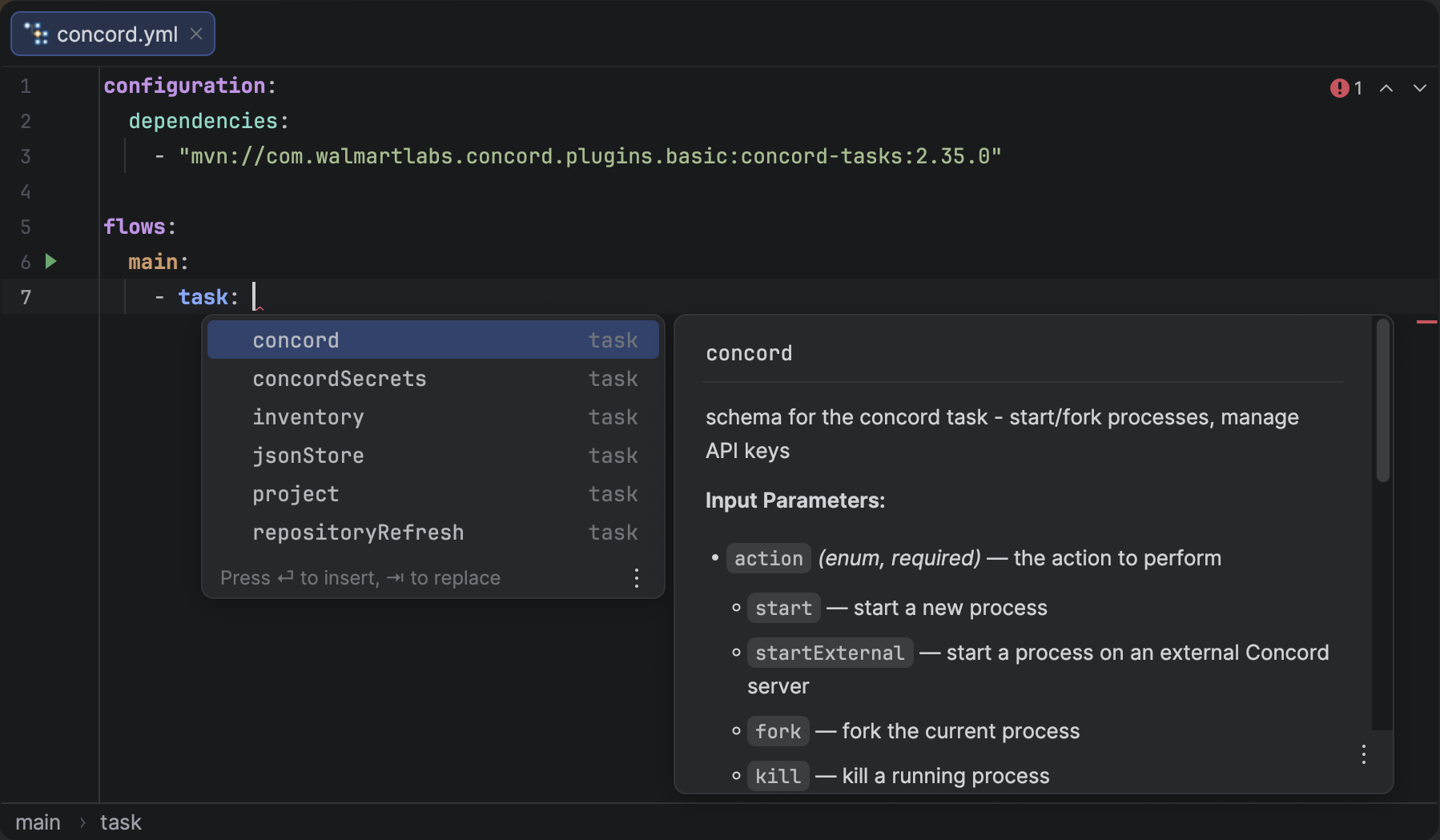
<p>While the completion list is open, you can now press <span class="keystroke__keystrokes"><kbd class="keystroke">Ctrl</kbd><kbd class="keystroke">Q</kbd></span> to preview documentation for the selected item without accepting it. This works for YAML keys, task names, and task parameters.</p>
<figure class="docFigure docFigure--md"><img src="https://brig.github.io/concord-intellij-ng/assets/images/completion-doc-task-74ff9d8955aa1adf5e4ea2a079bd7fdb.png" alt="Task Name Documentation in Completion"><figcaption><p>Quick documentation for a task name showing description, input and output parameters.</p></figcaption></figure>
<figure class="docFigure docFigure--lg"><img src="https://brig.github.io/concord-intellij-ng/assets/images/completion-doc-param-fd30bcbab8ea0e56f79d517928612a65.png" alt="Task Parameter Documentation in Completion"><figcaption><p>Quick documentation for a task parameter showing its type and description.</p></figcaption></figure>
<h2 class="anchor anchorTargetStickyNavbar_Vzrq" id="server-only-dependency-inspection">Server-Only Dependency Inspection<a href="https://brig.github.io/concord-intellij-ng/blog/whats-new-0.19.0#server-only-dependency-inspection" class="hash-link" aria-label="Direct link to Server-Only Dependency Inspection" title="Direct link to Server-Only Dependency Inspection" translate="no">​</a></h2>
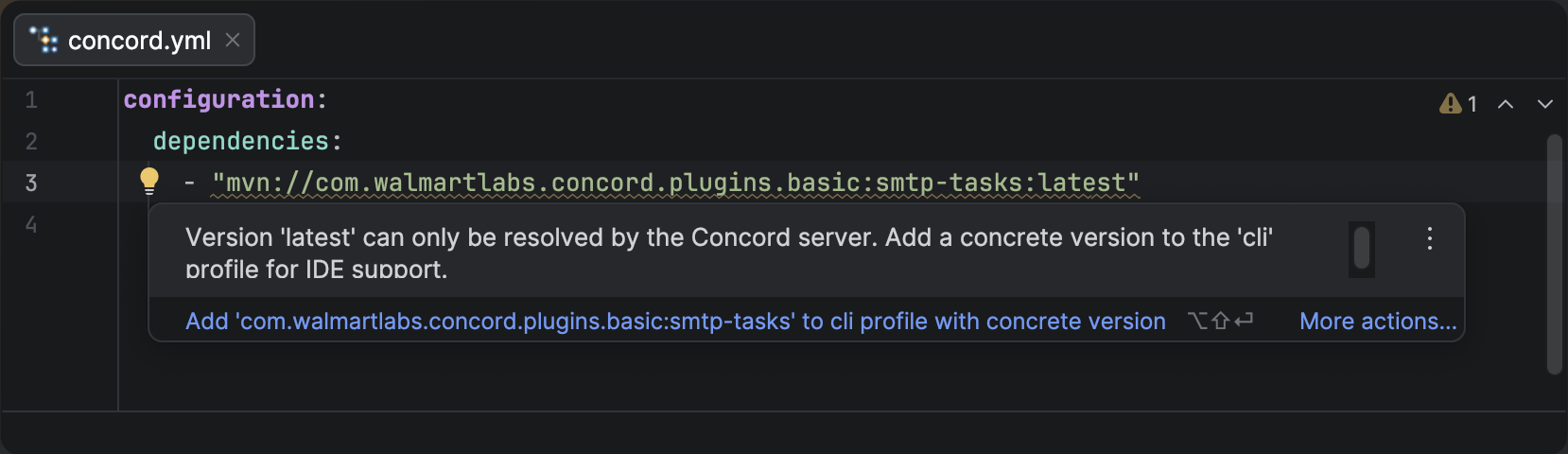
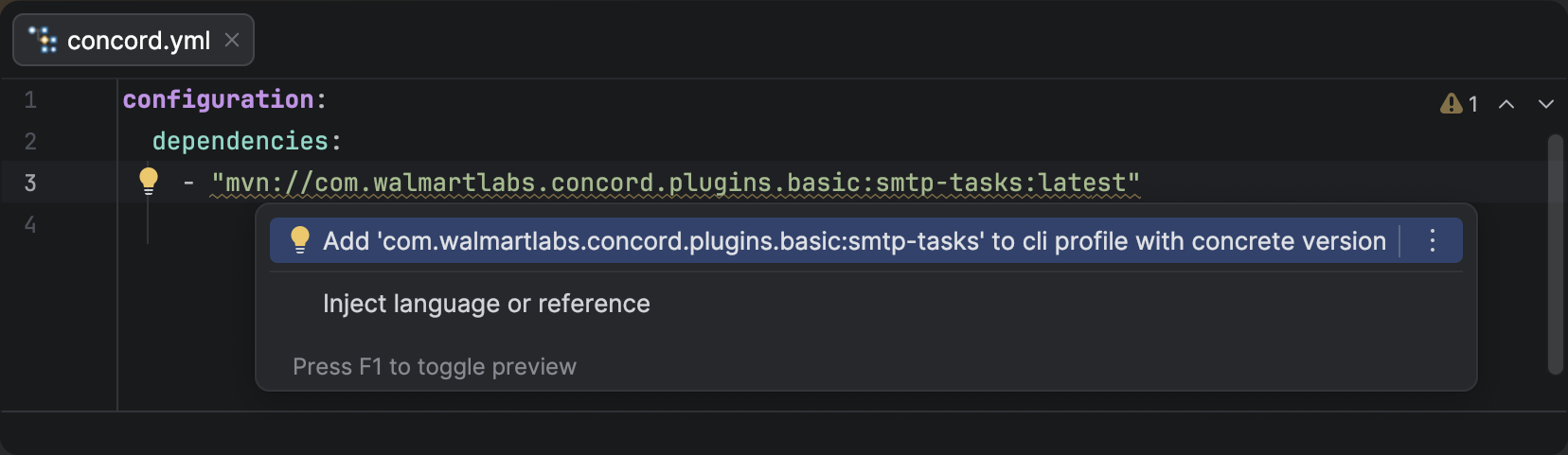
<p>Dependencies that use version strings like <code>latest</code> — resolved at runtime by the Concord server but not by the IDE locally — are now detected and flagged with a weak warning. The plugin offers a <strong>quick fix</strong> that adds a concrete version to the <code>cli</code> profile, giving the IDE what it needs without affecting server execution.</p>
<figure class="docFigure docFigure--lg"><img src="https://brig.github.io/concord-intellij-ng/assets/images/deps-inspection-warn-02e7e0393395dba2d19985aabf18c6d0.png" alt="Server-only dependency version warning"><figcaption><p>Weak warning on a dependency with <code>latest</code> version that cannot be resolved locally.</p></figcaption></figure>
<figure class="docFigure docFigure--lg"><img src="https://brig.github.io/concord-intellij-ng/assets/images/deps-quick-fix-257210c91c49304026ebc8034e8c9061.png" alt="Quick fix to add dependency to cli profile"><figcaption><p>Quick fix suggesting to add the dependency to the <code>cli</code> profile with a concrete version.</p></figcaption></figure>
<h2 class="anchor anchorTargetStickyNavbar_Vzrq" id="other-improvements">Other Improvements<a href="https://brig.github.io/concord-intellij-ng/blog/whats-new-0.19.0#other-improvements" class="hash-link" aria-label="Direct link to Other Improvements" title="Direct link to Other Improvements" translate="no">​</a></h2>
<ul>
<li class=""><strong>Tool Window Icon:</strong> Fixed the tool window icon to use proper SVG format.</li>
</ul>]]></content>
        <author>
            <name>Brig</name>
            <uri>https://github.com/brig</uri>
        </author>
        <category label="Release" term="Release"/>
        <category label="Features" term="Features"/>
    </entry>
    <entry>
        <title type="html"><![CDATA[What's New in Concord IntelliJ 0.18.0]]></title>
        <id>https://brig.github.io/concord-intellij-ng/blog/whats-new-0.18.0</id>
        <link href="https://brig.github.io/concord-intellij-ng/blog/whats-new-0.18.0"/>
        <updated>2026-02-07T00:00:00.000Z</updated>
        <summary type="html"><![CDATA[The 0.18.0 release introduces the Concord Tool Window for a bird's-eye view of your project,]]></summary>
        <content type="html"><![CDATA[<p>The <code>0.18.0</code> release introduces the <strong><a class="" href="https://brig.github.io/concord-intellij-ng/docs/features/tool-window">Concord Tool Window</a></strong> for a bird's-eye view of your project,
<strong><a class="" href="https://brig.github.io/concord-intellij-ng/docs/features/dependencies">Dependency Management</a></strong> with task name completion and error reporting,
and <strong><a class="" href="https://brig.github.io/concord-intellij-ng/docs/features/navigation#related-symbol">Related Symbol</a></strong> navigation to quickly jump to root files.</p>
<h2 class="anchor anchorTargetStickyNavbar_Vzrq" id="concord-tool-window">Concord Tool Window<a href="https://brig.github.io/concord-intellij-ng/blog/whats-new-0.18.0#concord-tool-window" class="hash-link" aria-label="Direct link to Concord Tool Window" title="Direct link to Concord Tool Window" translate="no">​</a></h2>
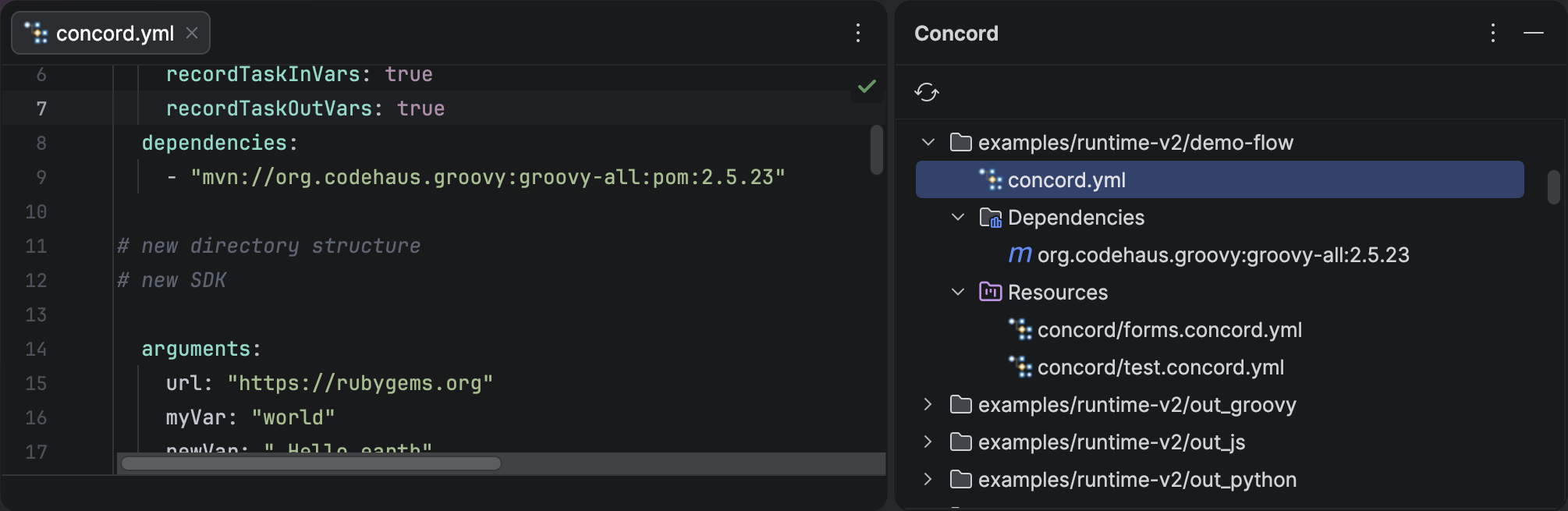
<p>A new dedicated tool window gives you an at-a-glance overview of your Concord project structure.
The tree displays your scopes, root files, dependencies, and resources in a single panel.</p>
<ul>
<li class=""><strong>Navigate Instantly:</strong> Double-click any item to jump directly to its source.</li>
<li class=""><strong>Always Up-to-Date:</strong> The tree automatically refreshes when project files change.</li>
<li class=""><strong>Scope Awareness:</strong> Each scope is displayed as a top-level node, making it easy to work with monorepos.</li>
</ul>
<figure class="docFigure docFigure--lg"><img src="https://brig.github.io/concord-intellij-ng/assets/images/concord-tool-window-4a2b49c107b71107b8148ad7ea12604c.png" alt="Concord Tool Window"><figcaption><p>The Concord Tool Window shows your project's scopes, root files, dependencies, and resources.</p></figcaption></figure>
<h2 class="anchor anchorTargetStickyNavbar_Vzrq" id="dependency-management">Dependency Management<a href="https://brig.github.io/concord-intellij-ng/blog/whats-new-0.18.0#dependency-management" class="hash-link" aria-label="Direct link to Dependency Management" title="Direct link to Dependency Management" translate="no">​</a></h2>
<h3 class="anchor anchorTargetStickyNavbar_Vzrq" id="task-name-completion">Task Name Completion<a href="https://brig.github.io/concord-intellij-ng/blog/whats-new-0.18.0#task-name-completion" class="hash-link" aria-label="Direct link to Task Name Completion" title="Direct link to Task Name Completion" translate="no">​</a></h3>
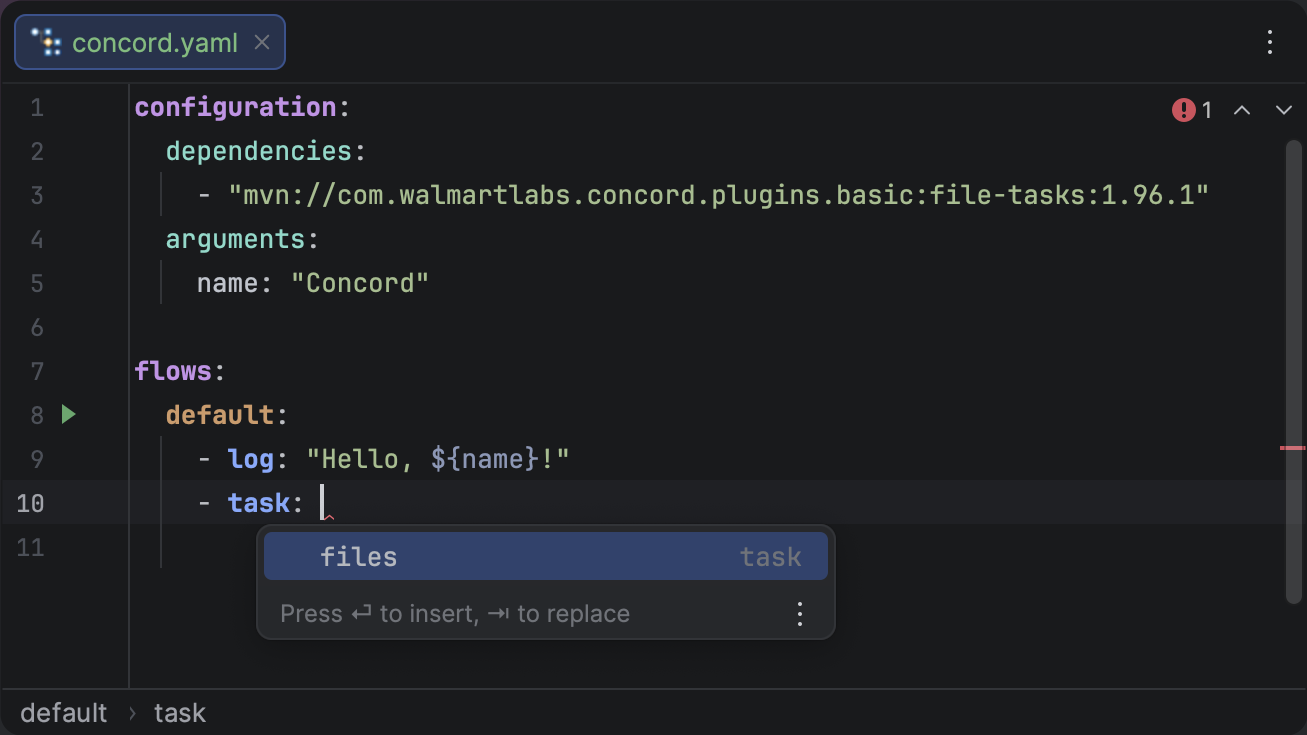
<p>The plugin now scans Maven dependencies declared in your <code>concord.yaml</code> and extracts <code>@Named</code> task names from JARs.
This means you get scope-aware autocompletion for <span class="tokenBadge" data-kind="step">task</span> step values—no more guessing task names or hunting through documentation.</p>
<figure class="docFigure docFigure--sm5"><img src="https://brig.github.io/concord-intellij-ng/assets/images/task-name-autocompletion-18027f0e144370d6be87fd9bfbad6428.png" alt="Task Name Autocompletion"><figcaption><p>Task names are extracted from Maven dependencies and suggested as you type.</p></figcaption></figure>
<h3 class="anchor anchorTargetStickyNavbar_Vzrq" id="dependency-error-reporting">Dependency Error Reporting<a href="https://brig.github.io/concord-intellij-ng/blog/whats-new-0.18.0#dependency-error-reporting" class="hash-link" aria-label="Direct link to Dependency Error Reporting" title="Direct link to Dependency Error Reporting" translate="no">​</a></h3>
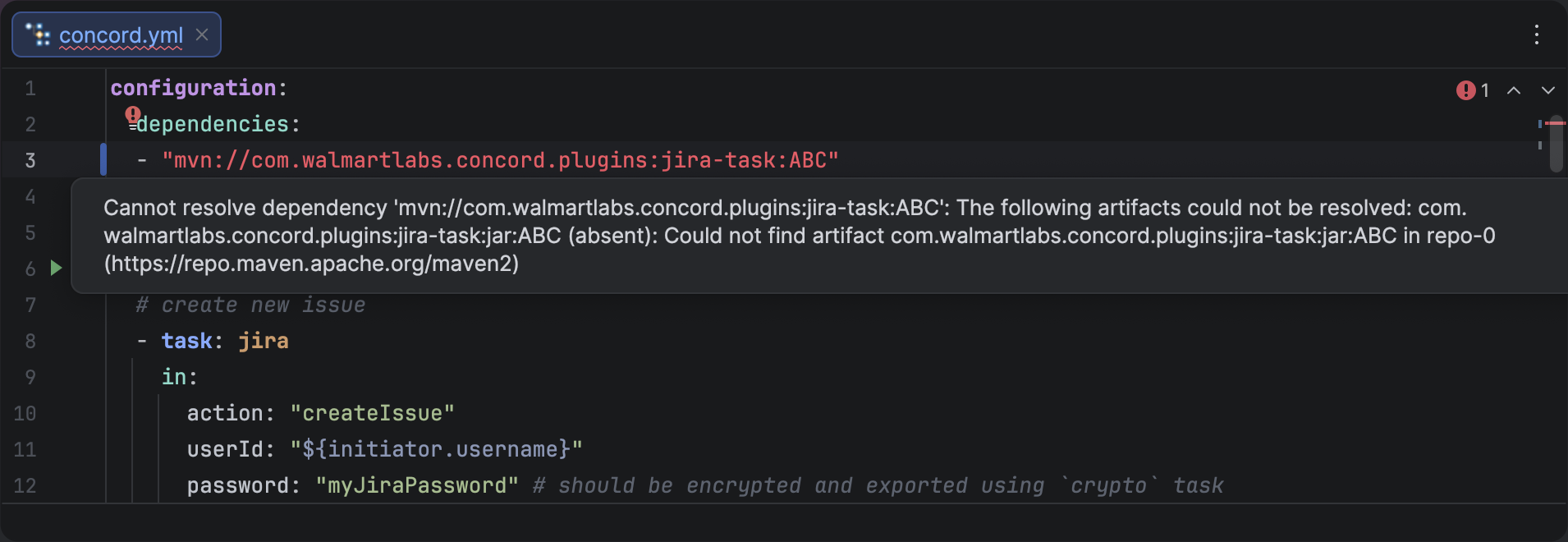
<p>Unresolved dependencies are now surfaced directly in the editor as inline inspections,
so you can spot configuration problems without leaving your flow file.
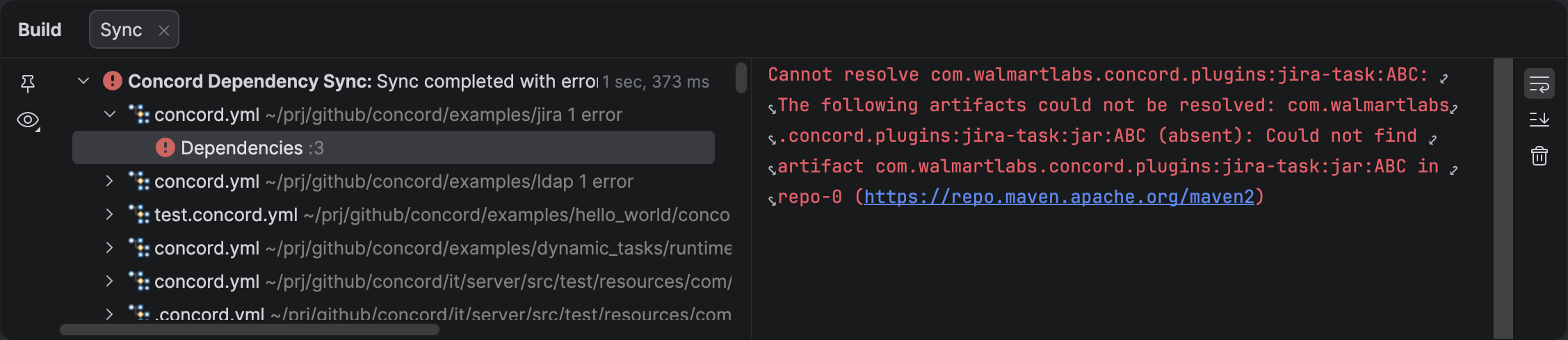
Errors are also reported in the <strong>Build Sync</strong> tab with clickable navigation,
and problem files are marked red in the Project tree.</p>
<figure class="docFigure docFigure--lg"><img src="https://brig.github.io/concord-intellij-ng/assets/images/unresolved-dependency-editor-b7abcc9565d9810084731376cbee814e.png" alt="Unresolved Dependency Editor Inspection"><figcaption><p>Unresolved dependencies appear as inline editor inspections with descriptive messages.</p></figcaption></figure>
<figure class="docFigure docFigure--lg"><img src="https://brig.github.io/concord-intellij-ng/assets/images/unresolved-dependency-sync-6d8bb6ed40a27da16ff4be1e4f9ea72a.png" alt="Unresolved Dependency Build Sync"><figcaption><p>The Build Sync tab lists all dependency errors with clickable links to the source.</p></figcaption></figure>
<h2 class="anchor anchorTargetStickyNavbar_Vzrq" id="related-symbol-navigation">Related Symbol Navigation<a href="https://brig.github.io/concord-intellij-ng/blog/whats-new-0.18.0#related-symbol-navigation" class="hash-link" aria-label="Direct link to Related Symbol Navigation" title="Direct link to Related Symbol Navigation" translate="no">​</a></h2>
<p>You can now navigate from any Concord file to its associated root <code>concord.yaml</code> file.
This is especially useful in large projects where resource files are deeply nested.</p>
<ul>
<li class=""><strong>Shortcut:</strong> <span class="keystroke__keystrokes"><kbd class="keystroke">Ctrl</kbd><kbd class="keystroke">Alt</kbd><kbd class="keystroke">Home</kbd></span></li>
<li class=""><strong>Menu:</strong> Go to <strong>Navigate</strong> &gt; <strong>Related Symbol</strong></li>
</ul>
<p>If a file belongs to multiple scopes, a popup will let you choose which root to navigate to.</p>
<h2 class="anchor anchorTargetStickyNavbar_Vzrq" id="other-improvements">Other Improvements<a href="https://brig.github.io/concord-intellij-ng/blog/whats-new-0.18.0#other-improvements" class="hash-link" aria-label="Direct link to Other Improvements" title="Direct link to Other Improvements" translate="no">​</a></h2>
<ul>
<li class=""><strong>Scope-Strict Flow Completion:</strong> Flow completion now strictly respects the search scope, preventing suggestions from leaking across project boundaries.</li>
</ul>]]></content>
        <author>
            <name>Brig</name>
            <uri>https://github.com/brig</uri>
        </author>
        <category label="Release" term="Release"/>
        <category label="Features" term="Features"/>
    </entry>
    <entry>
        <title type="html"><![CDATA[What’s New in Concord IntelliJ 0.17.0]]></title>
        <id>https://brig.github.io/concord-intellij-ng/blog/whats-new-0.17.0</id>
        <link href="https://brig.github.io/concord-intellij-ng/blog/whats-new-0.17.0"/>
        <updated>2026-01-30T00:00:00.000Z</updated>
        <summary type="html"><![CDATA[The 0.17.0 release brings a significant boost to developer productivity with Automatic Language Injection for script steps.]]></summary>
        <content type="html"><![CDATA[<p>The <code>0.17.0</code> release brings a significant boost to developer productivity with <strong><a class="" href="https://brig.github.io/concord-intellij-ng/docs/features/language-injection">Automatic Language Injection</a></strong> for script steps.
This update also introduces <strong><a class="" href="https://brig.github.io/concord-intellij-ng/docs/features/run-configurations">Run Configurations</a></strong> to execute flows locally, <strong><a class="" href="https://brig.github.io/concord-intellij-ng/docs/features/breadcrumbs">editor breadcrumbs</a></strong>,
and improves scope safety with smarter <a class="" href="https://brig.github.io/concord-intellij-ng/docs/features/inspections">inspections</a>.</p>
<h2 class="anchor anchorTargetStickyNavbar_Vzrq" id="run-configurations">Run Configurations<a href="https://brig.github.io/concord-intellij-ng/blog/whats-new-0.17.0#run-configurations" class="hash-link" aria-label="Direct link to Run Configurations" title="Direct link to Run Configurations" translate="no">​</a></h2>
<p>You can now execute Concord flows locally directly from the IDE. This feature is powered by the Concord CLI,
enabling rapid feedback loops during development without needing to push changes to a server.</p>
<p>The easiest way to start a flow is by using the <strong>Run</strong> icon in the editor gutter next to the flow definition.
You can also right-click a flow name and select <strong>Run</strong>.</p>
<figure class="docFigure docFigure--sm00"><img src="https://brig.github.io/concord-intellij-ng/assets/images/concord-gutter-7d59713e43f1cb3a7402d643cc13c5ff.png" alt="Run Gutter Icon"><figcaption>Click the Play icon next to a flow name to execute it locally.</figcaption></figure>
<h3 class="anchor anchorTargetStickyNavbar_Vzrq" id="key-features">Key Features:<a href="https://brig.github.io/concord-intellij-ng/blog/whats-new-0.17.0#key-features" class="hash-link" aria-label="Direct link to Key Features:" title="Direct link to Key Features:" translate="no">​</a></h3>
<ul>
<li class=""><strong>Interactive Console:</strong> The output supports ANSI colors and <strong>clickable hyperlinks</strong> that take you directly to the source code on errors.</li>
<li class=""><strong>Automatic CLI Management:</strong> The plugin can automatically download and configure the Concord CLI for you.</li>
<li class=""><strong>Flexible Configuration:</strong> Customize <a class="" href="https://brig.github.io/concord-intellij-ng/docs/features/run-configurations#configuration-options">execution with parameters, working directory, and different modes</a> to fit your workflow.</li>
</ul>
<h2 class="anchor anchorTargetStickyNavbar_Vzrq" id="language-injection">Language Injection<a href="https://brig.github.io/concord-intellij-ng/blog/whats-new-0.17.0#language-injection" class="hash-link" aria-label="Direct link to Language Injection" title="Direct link to Language Injection" translate="no">​</a></h2>
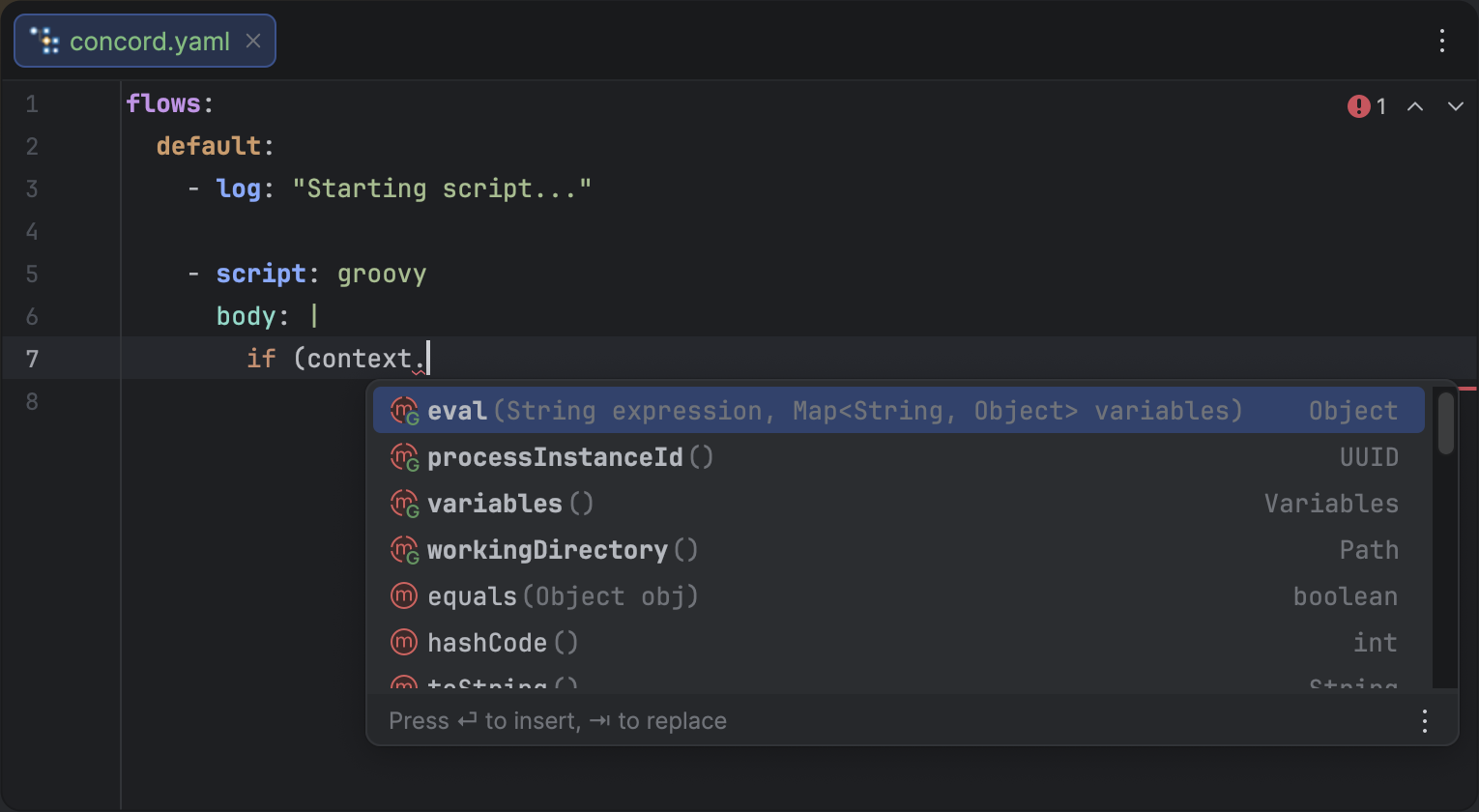
<p>Writing scripts inside YAML has always been a challenge—until now.
The plugin now automatically detects and injects the appropriate language into <span class="tokenBadge" data-kind="step">script</span> steps.</p>
<p>Whether you are writing <strong>Groovy</strong>, <strong>JavaScript</strong>, <strong>Python</strong>, or <strong>Ruby</strong>, you now get full IDE support directly inside your Concord files:</p>
<ul>
<li class=""><strong>Syntax Highlighting:</strong> No more plain text blocks. Code is colored and formatted correctly.</li>
<li class=""><strong>Code Completion:</strong> Access standard library functions and <a class="" href="https://brig.github.io/concord-intellij-ng/docs/features/language-injection#implicit-variables--autocompletion">Concord implicit variables</a>.</li>
<li class=""><strong>Inspections:</strong> Catch syntax errors in your scripts before running them.</li>
</ul>
<figure class="docFigure docFigure--lg"><img src="https://brig.github.io/concord-intellij-ng/assets/images/language-injection-ac6f29aeabe8c25f476da503f94405ad.png" alt="Language Injection Example"><figcaption><p>Full Groovy support inside a Concord script step.</p></figcaption></figure>
<h2 class="anchor anchorTargetStickyNavbar_Vzrq" id="improved-navigation--icons">Improved Navigation &amp; Icons<a href="https://brig.github.io/concord-intellij-ng/blog/whats-new-0.17.0#improved-navigation--icons" class="hash-link" aria-label="Direct link to Improved Navigation &amp; Icons" title="Direct link to Improved Navigation &amp; Icons" translate="no">​</a></h2>
<p>We've added a dedicated <strong>Icon Provider</strong> for Concord files.
Your Concord elements now have distinct icons in the Project View, Structure View, and Navigation popups,
making it easier to distinguish between:</p>
<ul>
<li class="">
<svg xmlns="http://www.w3.org/2000/svg" width="16" height="16" fill="none" stroke="#D19A66" stroke-linecap="round" stroke-linejoin="round" stroke-width="2" class="lucide lucide-workflow-icon lucide-workflow" viewBox="0 0 24 24" style="vertical-align:text-bottom"><rect width="8" height="8" x="3" y="3" rx="2"></rect><path d="M7 11v4a2 2 0 0 0 2 2h4"></path><rect width="8" height="8" x="13" y="13" rx="2"></rect></svg>
<strong>Flow</strong>
</li>
<li class="">
<svg xmlns="http://www.w3.org/2000/svg" width="16" height="16" fill="none" viewBox="0 0 16 16" style="vertical-align:text-bottom"><rect width="11" height="11" x="2.5" y="2.5" stroke="#6C707E" rx="1.5"></rect><path fill="#6C707E" d="m9.457 10.85-.325.65h-.673c-.851 0-1.473-.59-1.473-1.386L6.98 6.82H5.9l.005-.906h.704a.444.444 0 0 0 .464-.464V4.5h.944v1.413h1.446l-.006.906h-1.44v3.202a.56.56 0 0 0 .573.573h.867z"></path></svg>
<strong>Trigger</strong>
</li>
<li class="">
<svg xmlns="http://www.w3.org/2000/svg" width="16" height="16" fill="none" stroke="#D19A66" stroke-linecap="round" stroke-linejoin="round" stroke-width="2" class="lucide lucide-form-icon lucide-form" viewBox="0 0 24 24" style="vertical-align:text-bottom"><path d="M4 14h6M4 2h10"></path><rect width="16" height="4" x="4" y="18" rx="1"></rect><rect width="16" height="4" x="4" y="6" rx="1"></rect></svg>
<strong>Form</strong>
</li>
</ul>
<h2 class="anchor anchorTargetStickyNavbar_Vzrq" id="scope-safety-inspections">Scope Safety Inspections<a href="https://brig.github.io/concord-intellij-ng/blog/whats-new-0.17.0#scope-safety-inspections" class="hash-link" aria-label="Direct link to Scope Safety Inspections" title="Direct link to Scope Safety Inspections" translate="no">​</a></h2>
<p>Working in a monorepo can get messy. The plugin now includes an inspection to warn you if a file is <strong>Outside of Scope</strong>.</p>
<p>If you open a <code>.concord.yaml</code> file that isn't part of a defined Concord project (root or resource), the IDE will notify you.
This prevents confusion when features like navigation or completion seem "broken"
simply because the file isn't being indexed as part of the project context.</p>
<h2 class="anchor anchorTargetStickyNavbar_Vzrq" id="breadcrumbs">Breadcrumbs<a href="https://brig.github.io/concord-intellij-ng/blog/whats-new-0.17.0#breadcrumbs" class="hash-link" aria-label="Direct link to Breadcrumbs" title="Direct link to Breadcrumbs" translate="no">​</a></h2>
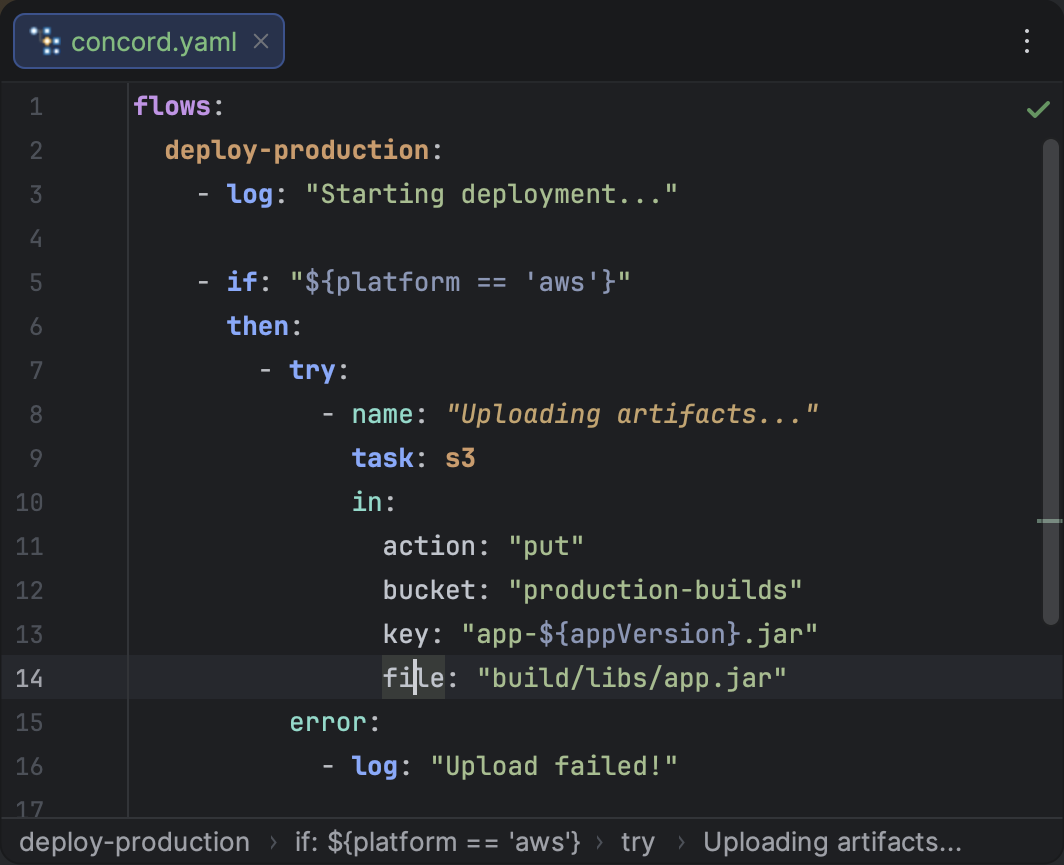
<p>Navigating through deeply nested YAML structures is now much easier.
The plugin now integrates with the IDE's <a class="" href="https://brig.github.io/concord-intellij-ng/docs/features/breadcrumbs"><strong>Breadcrumbs</strong></a>
component to show your current location within a <code>.concord.yaml</code> file.</p>
<p>The breadcrumbs bar at the bottom of the editor provides a clear path from the file root to your current element,
such as the active flow and the specific step you are editing. This is especially helpful when dealing with complex,
multi-step flows.</p>
<figure class="docFigure docFigure--sm5"><img src="https://brig.github.io/concord-intellij-ng/assets/images/breadcrumbs-8a2bd2a39fa8f584e83c0989eb243ccd.png" alt="Editor Breadcrumbs"><figcaption><p>Stay oriented with breadcrumbs showing your location in the flow hierarchy.</p></figcaption></figure>
<h2 class="anchor anchorTargetStickyNavbar_Vzrq" id="gitignore-support">Gitignore Support<a href="https://brig.github.io/concord-intellij-ng/blog/whats-new-0.17.0#gitignore-support" class="hash-link" aria-label="Direct link to Gitignore Support" title="Direct link to Gitignore Support" translate="no">​</a></h2>
<p>The plugin now respects <code>.gitignore</code> rules during Concord file discovery and <a class="" href="https://brig.github.io/concord-intellij-ng/docs/features/scopes#ignored-files">scope resolution</a>.
This ensures that ignored files and directories (like build artifacts or temporary files) are excluded from the project's scope,
making completion, navigation, and search results more accurate and relevant to your source code.</p>
<h2 class="anchor anchorTargetStickyNavbar_Vzrq" id="other-improvements">Other Improvements<a href="https://brig.github.io/concord-intellij-ng/blog/whats-new-0.17.0#other-improvements" class="hash-link" aria-label="Direct link to Other Improvements" title="Direct link to Other Improvements" translate="no">​</a></h2>
<ul>
<li class=""><strong>Completion Fixes:</strong> Improved reliability of completion functionality in multi-scope projects.</li>
</ul>]]></content>
        <author>
            <name>Brig</name>
            <uri>https://github.com/brig</uri>
        </author>
        <category label="Release" term="Release"/>
        <category label="Features" term="Features"/>
    </entry>
    <entry>
        <title type="html"><![CDATA[What’s New in Concord IntelliJ 0.16.0]]></title>
        <id>https://brig.github.io/concord-intellij-ng/blog/whats-new-0.16.0</id>
        <link href="https://brig.github.io/concord-intellij-ng/blog/whats-new-0.16.0"/>
        <updated>2026-01-23T00:00:00.000Z</updated>
        <summary type="html"><![CDATA[The 0.16.0 release focuses on deep project analysis and automated maintenance.]]></summary>
        <content type="html"><![CDATA[<p>The <code>0.16.0</code> release focuses on deep project analysis and automated maintenance.
This update introduces the <code>Call Hierarchy</code> tool window and a powerful set of <code>Quick Fixes</code> for flow documentation,
making it easier than ever to maintain large-scale Concord codebases.</p>
<h2 class="anchor anchorTargetStickyNavbar_Vzrq" id="call-hierarchy">Call Hierarchy<a href="https://brig.github.io/concord-intellij-ng/blog/whats-new-0.16.0#call-hierarchy" class="hash-link" aria-label="Direct link to Call Hierarchy" title="Direct link to Call Hierarchy" translate="no">​</a></h2>
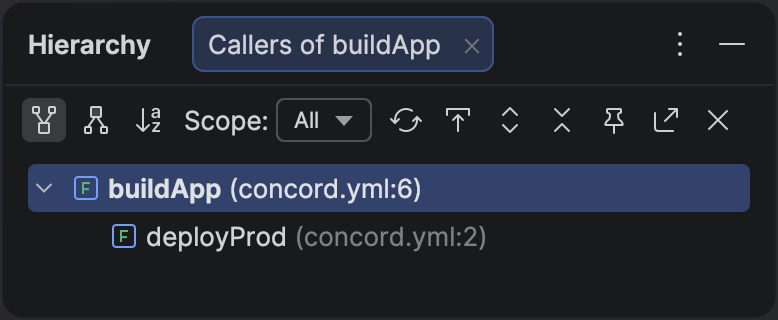
<p>Understanding flow dependencies is critical for impact analysis.
The new <a class="" href="https://brig.github.io/concord-intellij-ng/docs/features/call-hierarchy">Call Hierarchy</a> view allows you to visualize caller-callee relationships as a hierarchical tree.</p>
<p>You can now instantly answer questions like:</p>
<ul>
<li class="">"Which flows call this common utility?" (Caller Hierarchy)</li>
<li class="">"What is the complete execution chain of this main process?" (Callee Hierarchy)</li>
</ul>
<figure class="docFigure docFigure--sm0"><img src="https://brig.github.io/concord-intellij-ng/assets/images/callers-of-build-app-77de909ebc240ab16d4cf812d166f807.png" alt="Call Hierarchy View"><figcaption><p>The Call Hierarchy view provides a bird's-eye view of your project's flow dependencies.</p></figcaption></figure>
<h2 class="anchor anchorTargetStickyNavbar_Vzrq" id="rename-refactoring">Rename Refactoring<a href="https://brig.github.io/concord-intellij-ng/blog/whats-new-0.16.0#rename-refactoring" class="hash-link" aria-label="Direct link to Rename Refactoring" title="Direct link to Rename Refactoring" translate="no">​</a></h2>
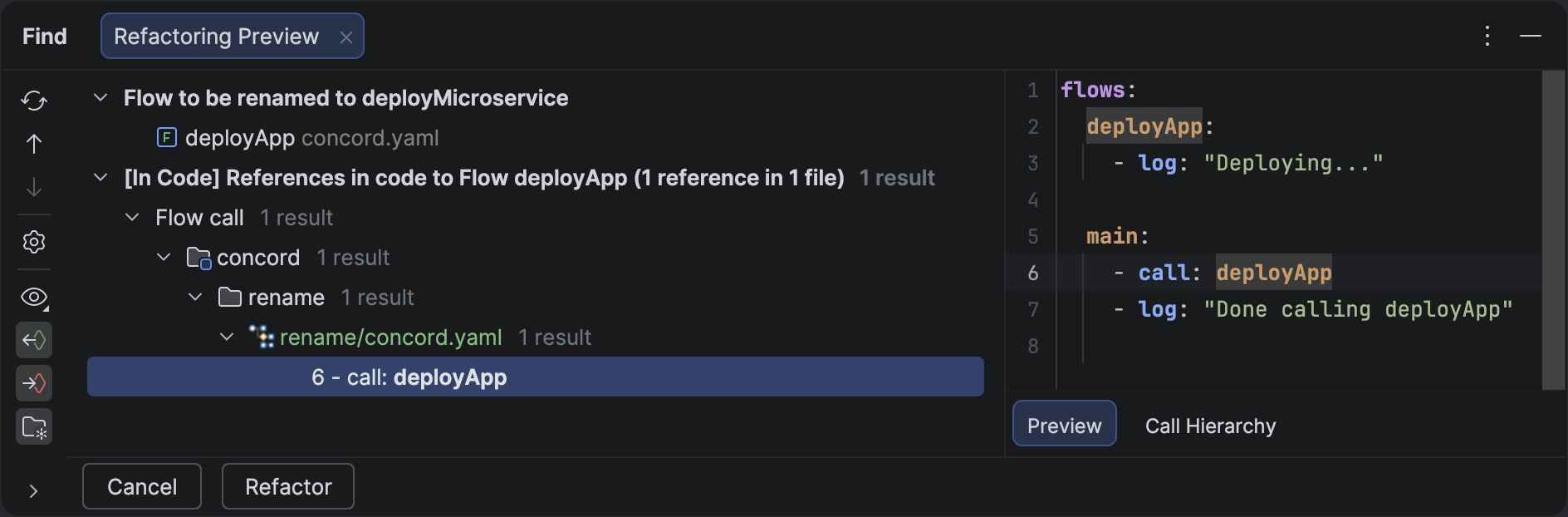
<p>Renaming a flow across a large project used to be error-prone.
With the new <strong>Rename Refactoring</strong>, you can safely rename a flow definition,
and the plugin will automatically update every <span class="tokenBadge" data-kind="step">call</span> referencing it within the current scope.</p>
<ul>
<li class=""><strong>Safe:</strong> Updates strictly confined to the project scope.</li>
<li class=""><strong>Preview:</strong> Review all changes before applying them.</li>
<li class=""><strong>Shortcut:</strong> Just press  <span class="keystroke__keystrokes"><kbd class="keystroke">Shift</kbd><kbd class="keystroke">F6</kbd></span> on any flow name.</li>
</ul>
<figure class="docFigure"><img src="https://brig.github.io/concord-intellij-ng/assets/images/rename-60cf13373ec37b581bb3303bc095f14b.png" alt="Rename Refactoring"><figcaption><p>Rename a flow once, and all references are updated instantly.</p></figcaption></figure>
<h2 class="anchor anchorTargetStickyNavbar_Vzrq" id="smart-inspections-duplicate-flows">Smart Inspections: Duplicate Flows<a href="https://brig.github.io/concord-intellij-ng/blog/whats-new-0.16.0#smart-inspections-duplicate-flows" class="hash-link" aria-label="Direct link to Smart Inspections: Duplicate Flows" title="Direct link to Smart Inspections: Duplicate Flows" translate="no">​</a></h2>
<p>Naming collisions can lead to confusing bugs in complex projects. The plugin now includes a <strong>Duplicate Flow Name Inspection</strong> that warns you if the same flow name is defined multiple times within the same scope.</p>
<ul>
<li class=""><strong>Detection:</strong> Flags duplicate definitions even across different files.</li>
<li class=""><strong>Resolution:</strong> Provides a Quick Fix to show all conflicting definitions in a Usage View panel, making it easy to decide which one to rename or remove.</li>
</ul>
<h2 class="anchor anchorTargetStickyNavbar_Vzrq" id="flow-documentation-improvements">Flow Documentation Improvements<a href="https://brig.github.io/concord-intellij-ng/blog/whats-new-0.16.0#flow-documentation-improvements" class="hash-link" aria-label="Direct link to Flow Documentation Improvements" title="Direct link to Flow Documentation Improvements" translate="no">​</a></h2>
<p>We've significantly enhanced the developer experience for <a class="" href="https://brig.github.io/concord-intellij-ng/docs/features/flow-docs">Flow Documentation</a>. Documentation blocks are no longer just static comments—they are now actively maintained by the IDE.</p>
<h3 class="anchor anchorTargetStickyNavbar_Vzrq" id="new-quick-fixes">New Quick Fixes<a href="https://brig.github.io/concord-intellij-ng/blog/whats-new-0.16.0#new-quick-fixes" class="hash-link" aria-label="Direct link to New Quick Fixes" title="Direct link to New Quick Fixes" translate="no">​</a></h3>
<p>The plugin now detects and offers <a class="" href="https://brig.github.io/concord-intellij-ng/docs/features/quick-fixes">one-click fixes</a> for several common documentation issues:</p>
<ul>
<li class=""><strong>Missing Parameters:</strong> If you use a variable in a flow that isn't documented, the IDE will offer to add it to the <span class="tokenBadge" data-kind="doc-section">in:</span> section automatically.</li>
<li class=""><strong>Keyword Typos:</strong> Automatically correct common misspellings like <code>mandatry</code> or <code>optinal</code> in your documentation blocks.</li>
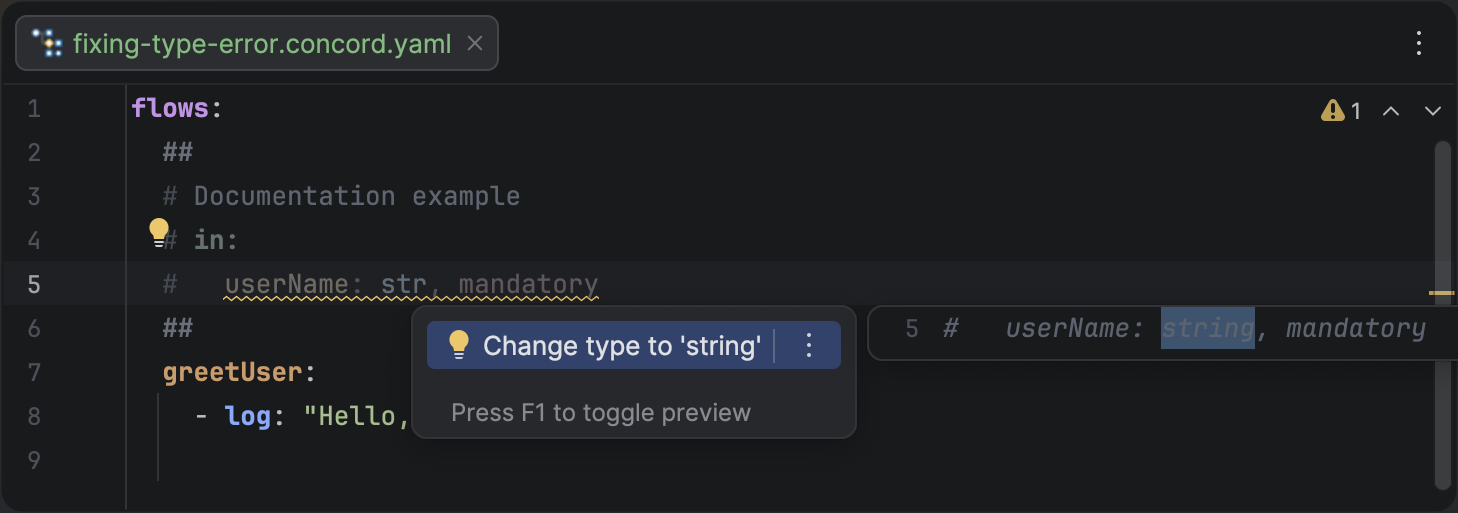
<li class=""><strong>Invalid Types:</strong> Misspelled types like <code>strnig</code> can now be instantly replaced with valid Concord types from a suggested list.</li>
<li class=""><strong>Broken Boundaries:</strong> A new quick fix helps you restore missing closing <code>##</code> markers.</li>
</ul>
<figure class="docFigure docFigure--md"><img src="https://brig.github.io/concord-intellij-ng/assets/images/quick-fixes-79d7b39edb025e14d3c26e01e83ac69a.png" alt="Quick Fixes Menu"><figcaption><p>Intelligent Quick Fixes help you keep your flow documentation accurate and up-to-date.</p></figcaption></figure>
<h3 class="anchor anchorTargetStickyNavbar_Vzrq" id="arbitrary-indentation">Arbitrary Indentation<a href="https://brig.github.io/concord-intellij-ng/blog/whats-new-0.16.0#arbitrary-indentation" class="hash-link" aria-label="Direct link to Arbitrary Indentation" title="Direct link to Arbitrary Indentation" translate="no">​</a></h3>
<p>Flow documentation blocks now support arbitrary indentation styles. Whether you prefer two spaces, four, or something else, the plugin correctly parses your parameters as long as they are more indented than the section headers.</p>
<h2 class="anchor anchorTargetStickyNavbar_Vzrq" id="multiple-scopes-support">Multiple Scopes Support<a href="https://brig.github.io/concord-intellij-ng/blog/whats-new-0.16.0#multiple-scopes-support" class="hash-link" aria-label="Direct link to Multiple Scopes Support" title="Direct link to Multiple Scopes Support" translate="no">​</a></h2>
<p>For teams working with monorepos, we've added full support for <a class="" href="https://brig.github.io/concord-intellij-ng/docs/features/scopes">Multiple Scopes</a>. The plugin now automatically isolates Concord projects within a single IntelliJ workspace.</p>
<ul>
<li class=""><strong>Isolation:</strong> References and completion are confined to the current project scope.</li>
<li class=""><strong>Discovery:</strong> <code>concord.yaml</code> files are automatically detected as project roots.</li>
<li class=""><strong>Search:</strong> Global search results now show the scope name (e.g., <code>[billing-service] deploy</code>) to help you distinguish between flows with identical names in different projects.</li>
</ul>
<h2 class="anchor anchorTargetStickyNavbar_Vzrq" id="enhanced-performance">Enhanced Performance<a href="https://brig.github.io/concord-intellij-ng/blog/whats-new-0.16.0#enhanced-performance" class="hash-link" aria-label="Direct link to Enhanced Performance" title="Direct link to Enhanced Performance" translate="no">​</a></h2>
<p>This release introduces smarter caching for flow documentation and input parameter resolution. These internal changes significantly reduce the CPU load when working with large files and improve the responsiveness of code completion and navigation.</p>]]></content>
        <author>
            <name>Brig</name>
            <uri>https://github.com/brig</uri>
        </author>
        <category label="Release" term="Release"/>
        <category label="Features" term="Features"/>
        <category label="Analysis" term="Analysis"/>
        <category label="Fixes" term="Fixes"/>
    </entry>
    <entry>
        <title type="html"><![CDATA[What’s New in Concord IntelliJ 0.15.0]]></title>
        <id>https://brig.github.io/concord-intellij-ng/blog/whats-new-0.15.0</id>
        <link href="https://brig.github.io/concord-intellij-ng/blog/whats-new-0.15.0"/>
        <updated>2026-01-14T00:00:00.000Z</updated>
        <summary type="html"><![CDATA[The 0.15.0 release introduces semantic syntax highlighting for Concord YAML files. This update transforms the way you read and write Concord flows by making the structure and logic of your automation code visually distinct.]]></summary>
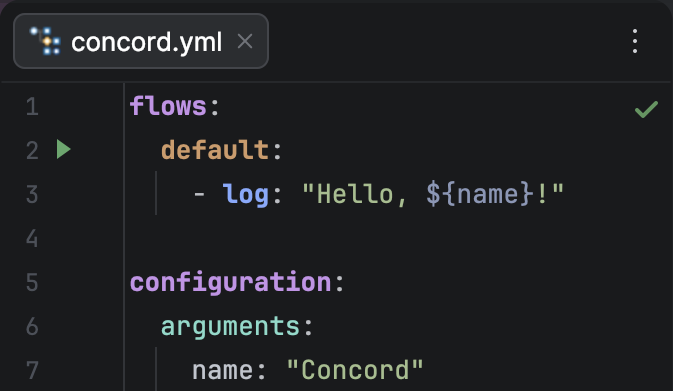
        <content type="html"><![CDATA[<p>The <code>0.15.0</code> release introduces semantic syntax <a class="" href="https://brig.github.io/concord-intellij-ng/docs/features/highlighting">highlighting</a> for Concord YAML files. This update transforms the way you read and write Concord flows by making the structure and logic of your automation code visually distinct.</p>
<figure class="docFigure docFigure--sm4"><img src="https://brig.github.io/concord-intellij-ng/assets/images/highlighting-c1123db247e931e58e170d244be50ebf.png" alt="Syntax Highlighting Preview"><figcaption><p>Semantic syntax highlighting makes it easy to distinguish between steps, flow names, and expressions.</p></figcaption></figure>
<h2 class="anchor anchorTargetStickyNavbar_Vzrq" id="semantic-syntax-highlighting">Semantic Syntax Highlighting<a href="https://brig.github.io/concord-intellij-ng/blog/whats-new-0.15.0#semantic-syntax-highlighting" class="hash-link" aria-label="Direct link to Semantic Syntax Highlighting" title="Direct link to Semantic Syntax Highlighting" translate="no">​</a></h2>
<h2 class="anchor anchorTargetStickyNavbar_Vzrq" id="ide-compatibility">IDE Compatibility<a href="https://brig.github.io/concord-intellij-ng/blog/whats-new-0.15.0#ide-compatibility" class="hash-link" aria-label="Direct link to IDE Compatibility" title="Direct link to IDE Compatibility" translate="no">​</a></h2>
<p>This release also updates the plugin to support <strong>IntelliJ IDEA 2025.3.1</strong>. We recommend updating your IDE to ensure the best performance and compatibility with the new highlighting features.</p>]]></content>
        <author>
            <name>Brig</name>
            <uri>https://github.com/brig</uri>
        </author>
        <category label="Release" term="Release"/>
        <category label="Highlighting" term="Highlighting"/>
    </entry>
</feed>