Quick Fixes
The Concord IntelliJ Plugin doesn't just find errors—it helps you fix them. Quick Fixes provide automated solutions for common typos, configuration errors, and documentation mismatches, saving you time and reducing manual effort.
How to Use
When the IDE detects a problem that has a known solution, it will offer a Quick Fix:
- Place the caret on the highlighted error or warning.
- Press AltEnter to open the intention menu.
- Select the suggested fix from the list and press
Enter.
Key Quick Fixes
1. Document Missing Parameter
If you use a new variable in your flow but haven't added it to the in: section of your Flow Documentation, the plugin can automatically add it for you with the correct type.
2. Correct Documentation Typos
The plugin recognizes common misspellings in documentation keywords (like mandatry instead of mandatory) and offers to replace them instantly.
3. Fix Invalid Types
If you enter an invalid type in a documentation block (e.g., strnig instead of string), the plugin provides a list of valid Concord types to choose from.
4. Resolve Duplicates
When a duplicate flow name is detected, the plugin can help you navigate between the definitions or provide options to resolve the conflict.
5. Add to cli Profile
When a dependency uses a server-only version like latest, the plugin offers to add a concrete version to the profiles.cli.configuration.dependencies section. This enables IDE features (completion, validation, hover docs) without changing the original dependency. The required YAML structure is created automatically if it doesn't exist.
See Dependencies — Server-Only Versions for details.
Example
Fixing a Type Error
Instantly correct typos in your documentation without re-typing:
Type an incorrect type like strnig in a flow documentation block, then press AltEnter to see suggestions.
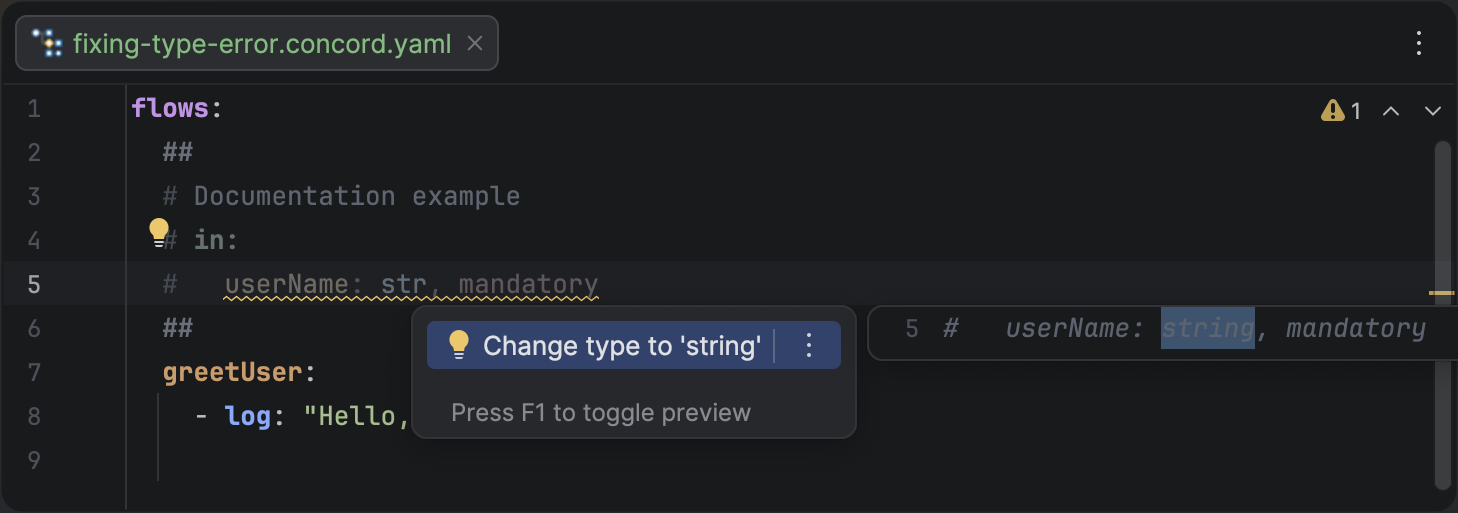
Using a Quick Fix to correct a misspelled type in a documentation block.
You can also apply Quick Fixes to your entire project at once by using Code | Inspect Code and selecting the "Fix all" option in the results tool window.