Breadcrumbs
The Concord IntelliJ Plugin integrates with the IDE's Breadcrumbs component to provide a horizontal navigation bar at the bottom of the editor. This helps you track your location within deeply nested Concord structures, such as complex flows or configuration blocks.
Overview
As you move your cursor through a .concord.yaml file, the breadcrumbs bar updates to show the path from the file root to the current element.
- Hierarchy: Displays the hierarchy of sections (e.g.,
flows>myFlow>task). - Navigation: Click on any element in the breadcrumb path to move the cursor to that element.
How to Enable
Breadcrumbs are usually enabled by default. If you don't see them:
- Go to Settings/Preferences.
- Navigate to Editor | General | Breadcrumbs.
- Ensure Show breadcrumbs is checked.
- Verify that Concord is checked in the language list.
- Placement: You can choose to show them at the Top or Bottom of the editor.
Features
- Context Awareness: Shows relevant names (e.g., flow names, step names like
call,log) rather than just generic YAML node types. - Quick Parent Access: Easily jump to the parent flow or section without scrolling.
Example
Visualizing the Path
The breadcrumbs bar shows you exactly where you are in the file hierarchy, even in deeply nested steps:
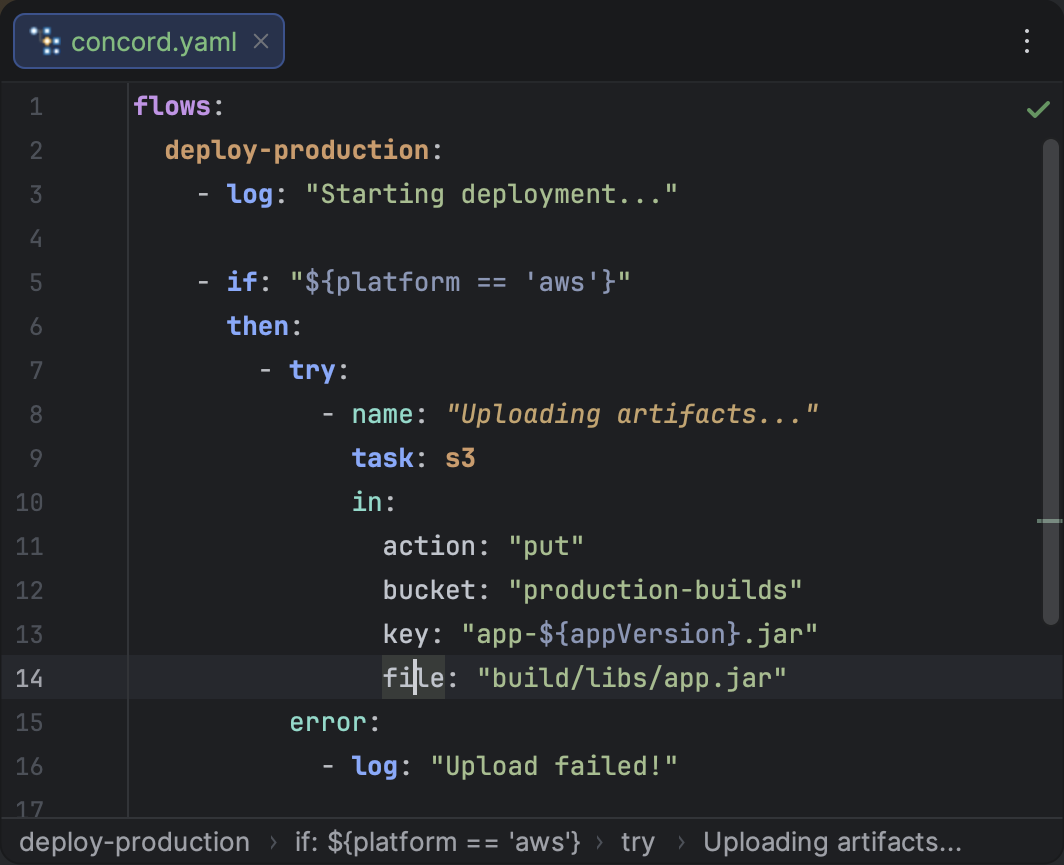
Breadcrumbs showing the path from the root to a nested step.
tip
Use breadcrumbs in combination with Structure View for complete control over your file navigation.