Syntax Highlighting
The Concord IntelliJ Plugin goes beyond standard YAML highlighting. It understands the structure and semantics of your Concord files, applying specific colors to different parts of the flow to improve readability.
This helps you instantly distinguish between a flow name, a step keyword, a variable expression, and a regular string.
Semantic Coloring
The plugin identifies and highlights the following elements distinctly:
1. Structural Elements
Top-level sections like flows, forms, triggers, configuration, and publicFlows are highlighted as keywords, making the high-level structure of the file obvious.
2. Flow Definitions & Calls
- Definitions: When you define a flow (e.g., myFlow:), it is highlighted as a flow declaration (function-like construct).
- Calls: When you use the call step, the target flow name is highlighted, making it easy to spot where execution jumps to another flow.
3. Steps & Keywords
Built-in steps (log, if, switch, return, throw, etc.) and task names are highlighted differently from regular YAML keys. This separates the "logic" from the "data".
4. Expressions
Concord expressions ${...} are highlighted at the lexer level, providing accurate, real-time coloring as you type. The ${ and } delimiters are highlighted distinctly from the surrounding text.
Expression highlighting works across all scalar types:
- Inline in strings:
"Hello, ${userName}!"— the${...}portion is colored as an expression while the rest stays string-colored. - Multiple expressions:
"${a} and ${b}"— each expression is highlighted independently. - Nested braces:
${foo({a: {b: 1}})}— brace depth is tracked, so the closing}is matched correctly. - Multi-line in block scalars: Expressions spanning multiple lines in
|(literal) or>(folded) scalars are fully recognized:
flows:
  main:
    - set:
        message: |
          ${hasVariable('snapshotVersion') ?
            "Deployment successful" :
            "Deployment pending"}
- Escaped expressions:
\${notAnExpression}is treated as plain text, not highlighted.
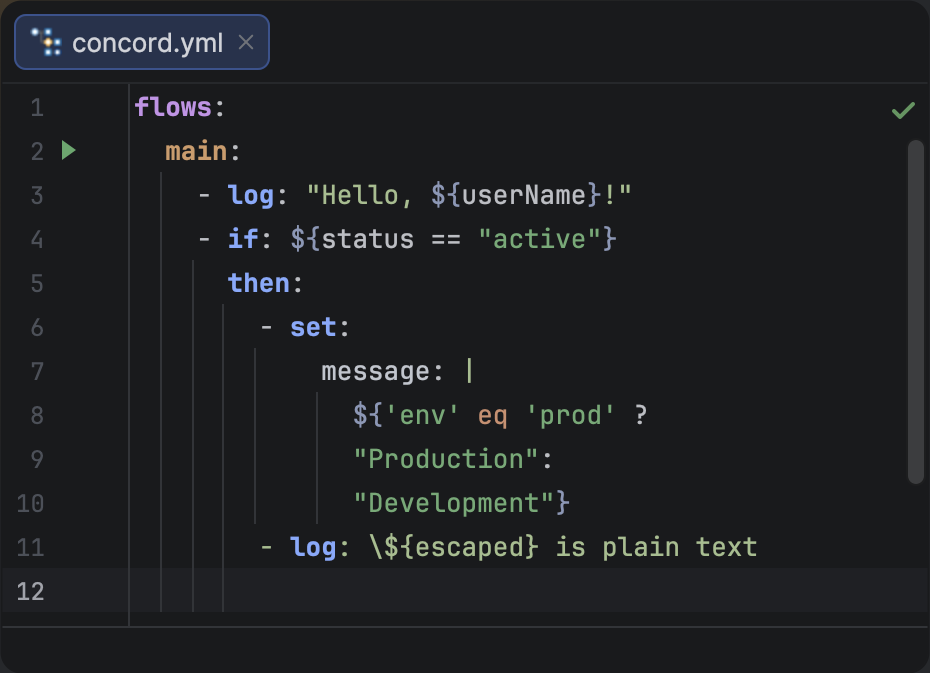
EL expression highlighting in Concord YAML files.
Unclosed expressions (e.g., "${missing_brace") are highlighted and reported as parser errors with a "missing }" message.
5. Flow Documentation
Structured flow documentation blocks are recognized and highlighted as documentation, with specific colors for in/out parameters, description text.
Customizing Colors
You can fully customize the color scheme to match your preferences or accessibility needs.
- Press CtrlAltS to open Settings
- Go to Editor | Color Scheme | Concord.
- Click on the element you want to change in the preview pane.
The plugin comes with built-in defaults that adapt to both Light and Dark IDE themes.
Example
Here is how the highlighter interprets different elements:
configuration:
  runtime: concord-v2

flows:
  # A simple flow definition
  default:
    - log: "Starting the process..."

    # 'call' keyword and flow name are distinct
    - call: deployApp
      in:
        appName: "my-app"
      out: result

    - if: ${result == "success"}
      then:
        - log: "Deployment successful!"

  ##
  # Deploys the application.
  # in:
  #   appName: string, mandatory, app name
  # out:
  #   result: string, mandatory, deployment result
  ##
  deployApp:
    - log: "Deploying ${appName}..."
configuration,flows— Top-level Sectionsdefault,deployApp— Flow Identifierslog,call,if— Keywords / Steps${result == "success"}— Expressions## ... ##— Documentation