Schema Validation
The Concord IntelliJ Plugin provides deep, semantic validation of your project. It doesn't just check for valid YAML syntax; it understands the rules of the Concord DSL and flags logical errors in real-time.
Key Inspections
Unknown or Invalid Keys
If you misspell a keyword or place it in the wrong context, the IDE will highlight it immediately.
flows:
  main:
    stepps: # Error: Unexpected key 'stepps'
      - log: "Hello"
Missing Required Keys
Some steps require specific keys to be functional. For example, an if step must have a then block.
flows:
  main:
    - if: "${deployFailed}" # Error: Missing required key 'then'
Duplicate Flow Definitions
Namespaces (Scopes) must have unique flow names. The plugin detects when you accidentally define the same flow multiple times across different files.
# In project-a/concord.yaml
flows:
  myFlow: # Warning: Duplicate flow definition
    - log: "A"

# In project-a/flows/utils.yaml
flows:
  myFlow: # Warning: Duplicate flow definition
    - log: "B"
Documentation Block Validation
The plugin also validates the content of your Flow Documentation, checking for valid types and keywords.
flows:
  ##
  # in:
  #    userName: strnig
  ##
  main:
    - log: "Hello, ${userName}"
How to Configure
Validation is implemented as standard IntelliJ inspections. You can customize their severity or disable them entirely:
- Open Settings | Editor | Inspections.
- Navigate to the Concord section.
- Adjust the severity of individual checks (Error, Warning, Weak Warning, etc.).
Example
Catching Errors Early
Real-time validation helps you fix issues before you even try to run the flow:
Intentionally misspell a keyword like log as logg and see the IDE highlight it with an error description.
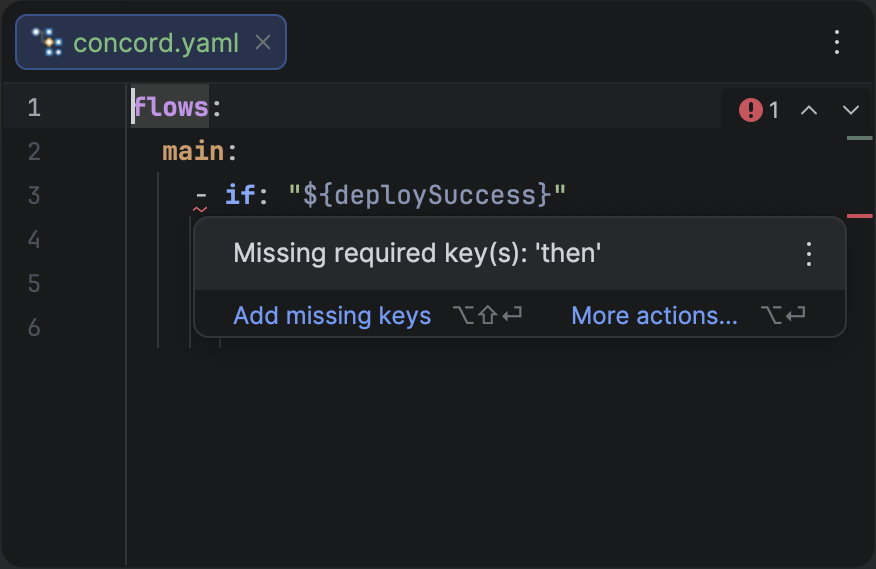
Real-time validation highlighting a missing required key in an if step.
Many validation errors come with suggested Quick Fixes. Press AltEnter to see available solutions.