Rename Refactoring
Renaming a flow in a large project can be risky if done manually. You might miss a reference in another file, leading to runtime errors.
The Rename Refactoring feature allows you to change a flow's name safely. The plugin automatically finds every call to that flow within the current Scope and updates them for you.
How to Use
- Place the caret on the flow name (at its definition or at any call site).
- Invoke Rename:
- Shortcut: ShiftF6
- Menu:
Refactor | Rename
- Type the new name and press
Enter.
Features
- Preview Changes: Before applying the rename, you can see a list of all files and lines that will be updated.
- Search in Comments: Optionally find and update the name inside comments and strings.
- Scope Protection: Rename only affects files within the relevant Concord scope, ensuring you don't accidentally change unrelated projects in a monorepo.
Example
Safe Refactoring
Watch as the plugin updates multiple files simultaneously to keep your project consistent:
Try it yourself
Select a flow name, press ShiftF6, type a new name, and observe how all call sites are updated instantly.
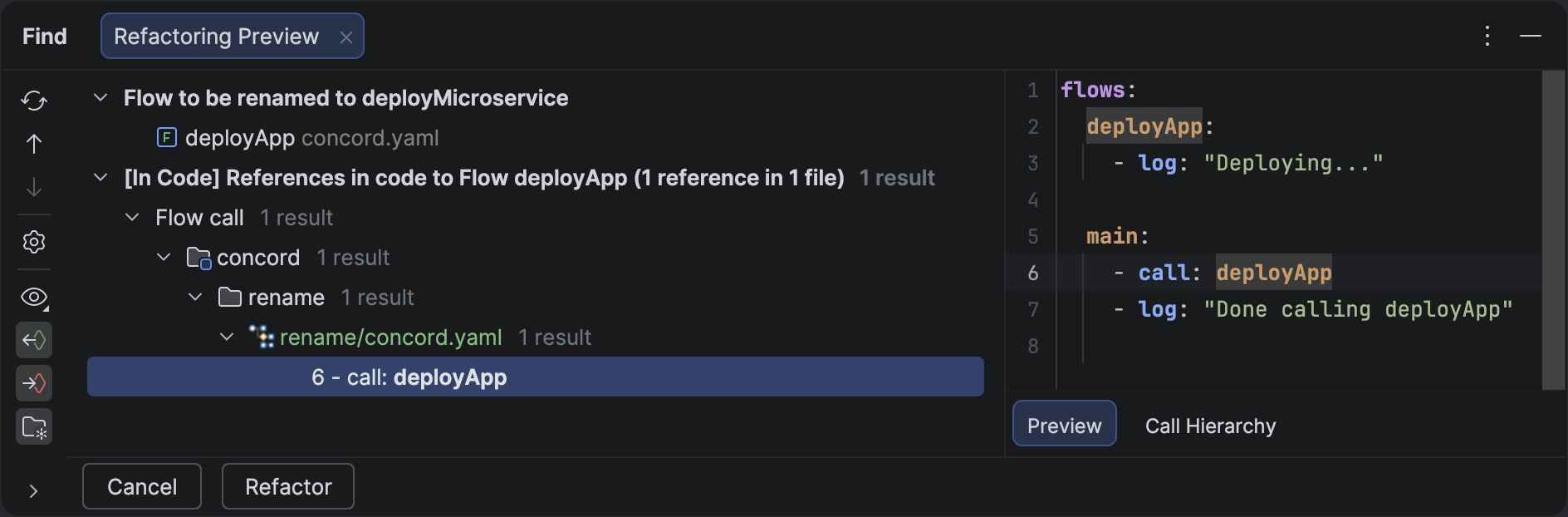
Renaming a flow definition automatically updates all call steps in the project.
Check Results
Always review the "Find Refactor Usages" tool window if it appears, to ensure that the rename is being applied exactly where you expect.